
How I Ship a Browser Strategy Game With Slash Commands and 12 Scripts
This dev log is about Inselnova: one island, sea wars and alliance politics in a world that never resets. Play free →
TL;DR: I replaced Trello with a custom tracker that lives in my game’s production database. Players report bugs from inside the game. AI skills in my editor wrap deterministic Node scripts for branching, committing, and deploying. The whole release cycle, from bug report to live on Render, runs through slash commands. If CI fails, the AI often fixes it and retries without me touching anything. Here’s how every piece connects.
Post 002 was about replacing SaaS tools with AI. This is the last replacement. Trello is gone. The entire development lifecycle now runs through a tracker I built myself, wired into the same database the game uses.
This is built around one person. But the same structure would work for a small team. The gates, the ticket requirements, the enforced commit format — none of that is specific to solo work. If anything, it gets more useful with more people, because the scripts don’t care who’s on the keyboard.
The tracker
Inselnova has an in-game feedback button. When a player sends a message, it hits the production database with their name, their world, and whatever they typed. The system tags it automatically based on the text. Everything lands in an “incoming” list.
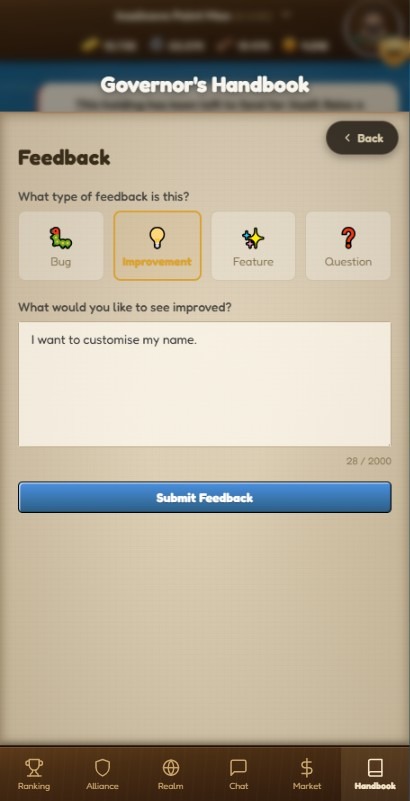
That’s one channel. Feedback also comes from Discord and from in-game chat messages.
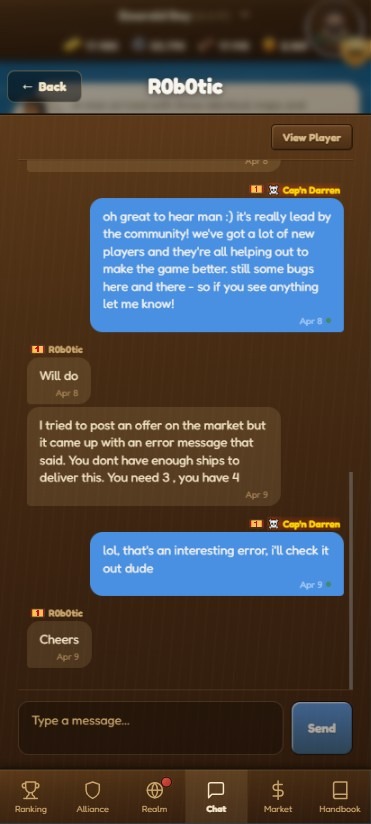
Players don’t always use the feedback button. Sometimes they mention a bug in alliance chat, or they drop a message in the Discord server. Right now I triage those manually. Later I want a bot that watches all three channels and funnels everything into the tracker automatically, so nothing gets missed regardless of where someone said it.
I triage from there. Issues move into icebox, to prioritise, or up next. No Trello board. No Jira. Just lists in a PostgreSQL database that the same codebase already manages.
The tracker is called Helm.
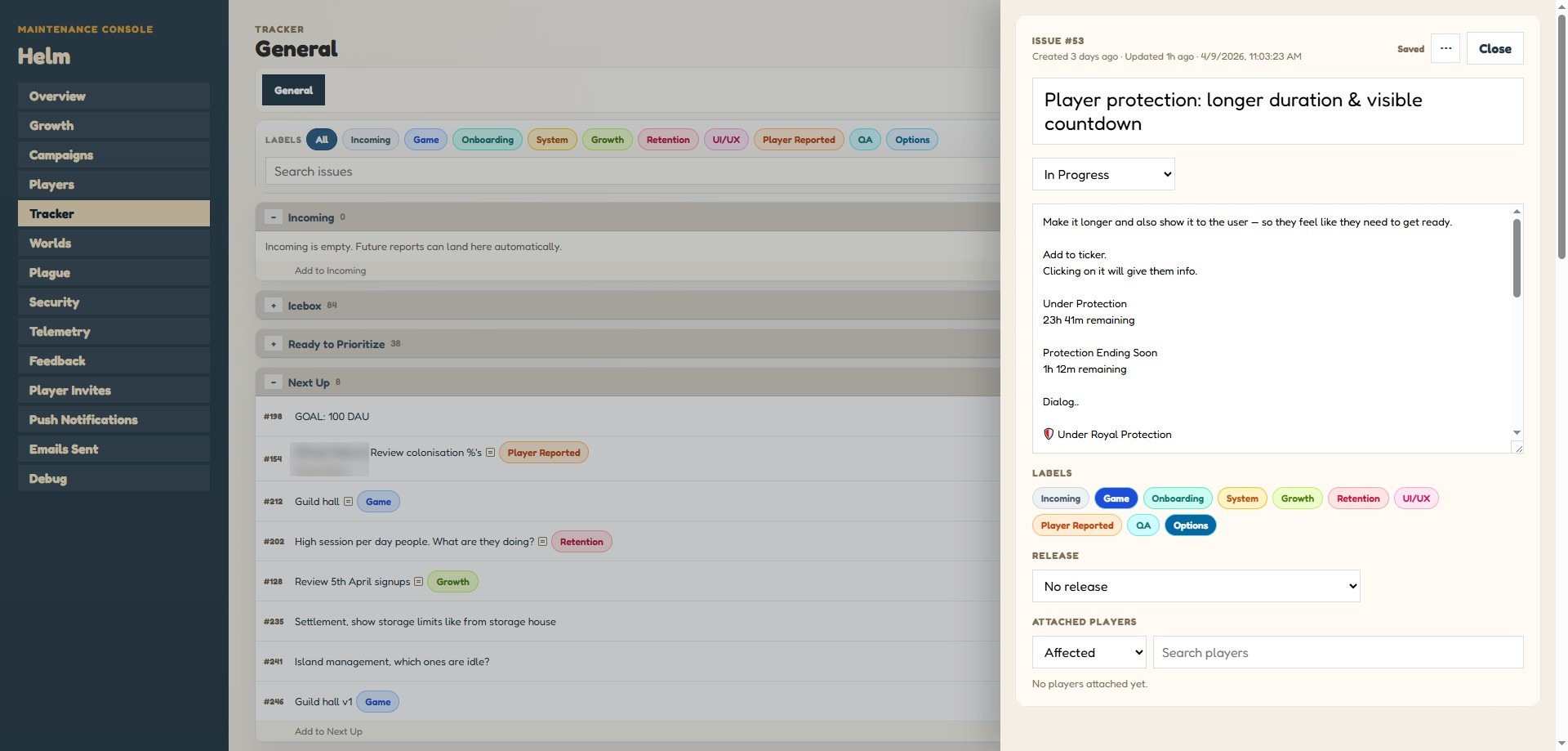
It stores releases, issues, events, and the relationships between them. Every state change gets logged. When something moves from “incoming” to “up next,” there’s a record of it. When a release ships, every linked issue moves to “done” in one database query.
The commands
Everything in the editor starts with a forward slash. These are AI skills, not AI decisions. Each one calls a Node script. The scripts do the actual work. The AI handles the conversation around it.
/release new creates a git branch from main. The branch name is the date. It also inserts a release record into the tracker with status “draft.” If a release already exists for that date, it appends a suffix. The script checks for a clean worktree, fetches origin, and refuses to run if you’re not on main.
/ticket <id> loads a tracker issue. The script connects to the production database, pulls the issue details, moves it to “in progress,” and saves context to a JSON file under .git/. The AI shows me the ticket and asks what I want to do.
I also include a short description when loading — something like /ticket 123 fix harbor rename. Without it the thread is just called “Ticket 123,” which tells you nothing when you have three or four sessions open at once. The description makes it easy to jump back into the right one.
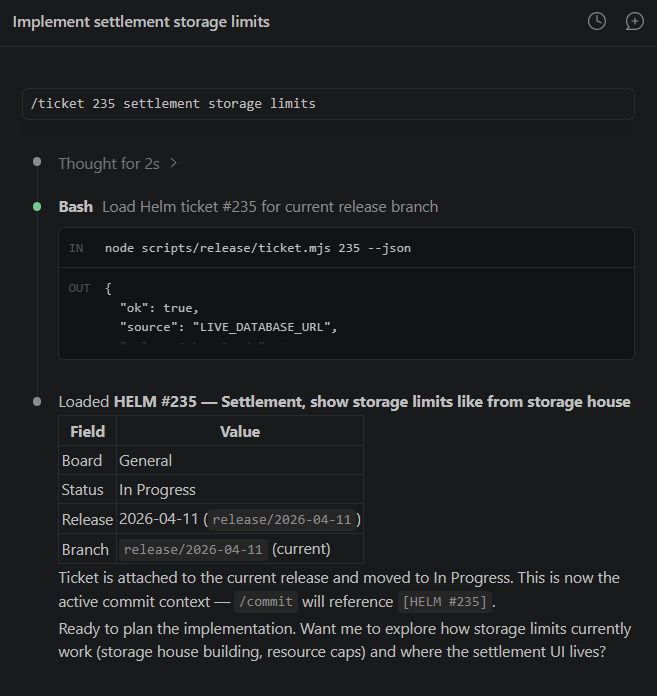
If there’s no ticket, I just say “make one.” /ticket new <description> previews a ticket first, derives the title from the first sentence, extracts any player mentions from the text, and only creates it when I add --confirm. Preview first, always.
/commit stages the changes, updates both changelogs, and writes the commit. The commit message format is enforced: [HELM #123] feat: description. A git hook validates it. Wrong format, wrong ticket ID, missing ticket context, the commit is rejected. No exceptions.
The skill also moves the ticket to “ready for deploy” in the tracker. One command handles the code side and the project management side at the same time.
/release ships it. This is the big one.
/hotfix <description> is the escape hatch. Sometimes a bug slips through a release and needs fixing immediately. Hotfix creates a throwaway branch, auto-generates a ticket with no preview step, runs CI, and merges automatically on green. No manual confirmation, no ceremony. The one hard gate is the same as always — CI has to pass. Everything else is skipped. It always produces a patch version bump.
Worth saying: I don’t always type the slash command explicitly. Claude Code has gotten a lot better at recognising when a skill applies. I can say “load in ticket 123” and it figures it out. Or mid-session I’ll say “let’s commit, this covers two tickets — 187 and 34” and it picks up both, asks what to do. The slash commands are there when I want to be precise. The rest of the time it’s just a conversation.
What a skill file actually looks like
People ask how this works in practice. Here’s the full /ticket skill file, exactly as it sits in the repo. This is the entire instruction set the AI reads when I type /ticket.
---
name: ticket
description: Load or create a Helm tracker issue inside the current release
  context. Use when the user says `/ticket <id>`, `/ticket new <description>`,
  mentions a Helm issue ID, or wants the session anchored to a specific tracker
  issue. Shared canonical skill for Claude and Codex. Prefer the repo automation
  script when available.
---

# /ticket

Use this skill to anchor the current session to a Helm tracker issue
or create a new one for the current release.

This command only works from a `release/<release-key>` branch.

## Command

Expected form:

  /ticket <id>
  /ticket new <description>
  /ticket rename <id> <new title>

## Workflow

### `/ticket <id>`

1. Parse the required numeric issue id from the command arguments.
2. Prefer running:

   node scripts/release/ticket.mjs <id> --json

3. If the script exists and succeeds, use its output as the source
   of truth for:
   - issue title
   - issue description
   - current board or release state
   - current release branch
   - any suggested status transition
   - active branch ticket context for later commits
4. If the script is missing, stop and say the shared `ticket` command
   is scaffolded but the supporting automation has not been
   implemented yet.
5. Do not invent tracker data.
6. The script automatically moves the loaded ticket to `In Progress`
   if it is not already there.

### `/ticket new <description>`

1. Parse the ticket description from the command arguments.
2. Prefer running the shared preview flow first:

   node scripts/release/ticket.mjs new <description> --json

3. Use the preview output as the source of truth for:
   - draft title
   - description
   - destination board and list (General / Ready for Deploy)
   - default labels (System)
   - current release linkage
   - extracted user hints
   - selected player attachment candidate and any ambiguous matches
4. Show the preview to the user and ask for confirmation before
   saving anything.
5. Only after the user clearly confirms, run:

   node scripts/release/ticket.mjs new <description> --confirm --json

6. If the preview shows ambiguous player matches, call that out and
   let the user confirm or revise before creating the ticket.
7. After a successful load or create, treat that ticket as the active
   commit context for the current branch.

### `/ticket rename <id> <new title>`

1. Parse the numeric issue id and the new title from the command
   arguments.
2. Run:

   node scripts/release/ticket.mjs rename <id> <new title> --json

3. The script renames the issue. If the title is already identical,
   it is a no-op.
4. After renaming, if this is the currently loaded ticket, update the
   active ticket context so `/commit` picks up the new title.

## Rules

- Treat the Helm issue as the canonical task reference for the
  session.
- Refuse to run unless the current git branch is
  `release/<release-key>`.
- Do not silently switch to a different issue.
- The shared ticket script must target `LIVE_DATABASE_URL`, never
  `DATABASE_URL` or local Helm sqlite defaults.
- Do not create a new tracker ticket without an explicit user
  confirmation step.
- The shared create flow should create new release-branch tickets in
  General / Ready for Deploy, apply the System label, and attach them
  to the current release branch when the live release record exists.
- If the command argument is missing or invalid, ask for the issue id
  or ticket description plainly.
- Keep the command behavior aligned across Claude and Codex by
  relying on repo scripts rather than tool-specific logic.
A few things to notice.
The skill doesn’t contain business logic. It tells the AI to call a script and use the output. The script does the database work. The skill handles the conversation: show the preview, ask for confirmation, explain what happened.
Rule 5 is important: “Do not invent tracker data.” Without that, the AI will sometimes fill in gaps with plausible-sounding information. With it, the AI either has real data from the script or it says it doesn’t know.
The same skill file works for both Claude Code and Codex. That’s the point of the “shared canonical skill” line in the description. One set of instructions, two AI editors. The scripts underneath are identical because they’re just Node files in the repo.
The release pipeline
When I type /release, the skill runs through eight steps in sequence. Each one calls a script. Each script checks the output of the previous step before doing anything.
Validate. The script queries the tracker. Are all issues in “ready for deploy” or “done”? Is the branch correct? Are there zero blocking issues? If anything is off, it stops and tells me why. No guessing, no warnings — it either passes or it doesn’t.
Prepare. Reads the [Unreleased] sections from both changelogs. Computes the next version, minor if there’s a [FEATURE] tag, patch otherwise. Updates package.json, promotes the changelog entries, sets the tracker status to “candidate.”
Commit. The version bump commit. Uses a HELM_RELEASE_COMMIT flag to bypass the normal ticket requirement, because this is release housekeeping, not ticket work.
Create PR. Pushes the branch, opens a PR on GitHub using the gh CLI. The PR title is “Release vX.Y.Z” and the body includes the player-facing changelog. The PR number goes back into the tracker.
The CI pipeline
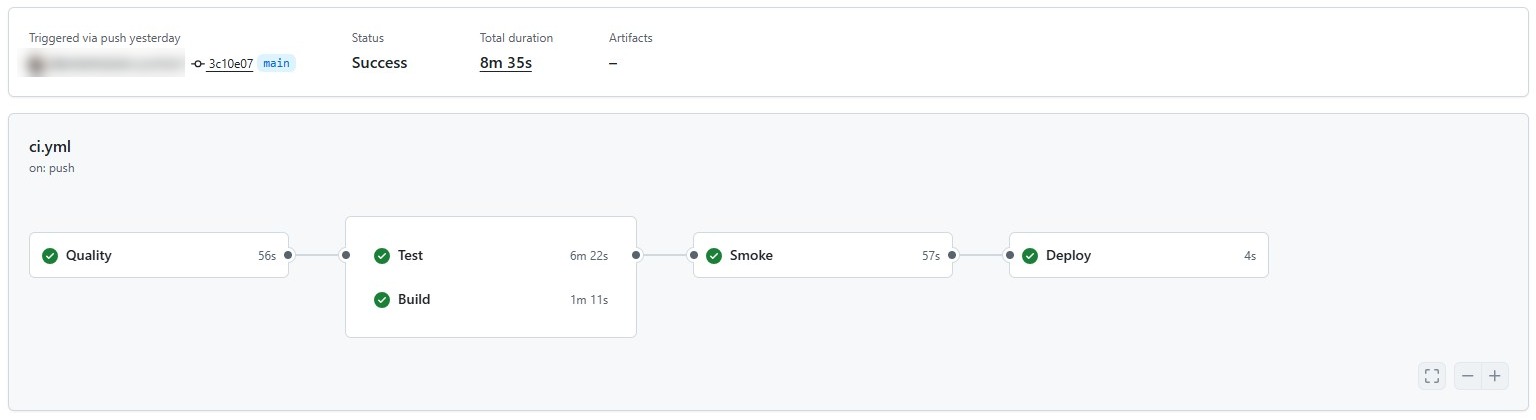
Poll CI is where it gets interesting. The script checks gh pr checks every 30 seconds, for up to 20 minutes. While it waits, GitHub Actions runs four stages.
First, quality checks. Type-checking across five workspaces: backend, app, frontend, ledger, and bots. Plus API drift detection, clock pinning validation, and a no-console check that catches raw console.error calls that should be going through the logger.
Second, tests and builds run in parallel. Backend tests, Helm tests, ledger tests on one side. Full production builds for every workspace on the other.
Third, Playwright end-to-end smoke tests. These run twice — a normal pass and a stability repeat. If a test is flaky, the repeat catches it.
Fourth, deploy. Only triggers on main. Hits a Render webhook.
The auto-fix
Here’s the part that saves the most time.
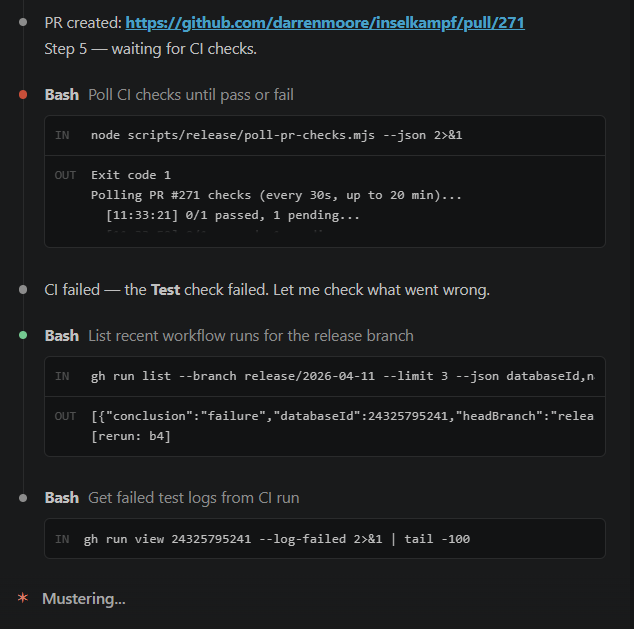
When the poll reports a failure, the AI reads the error output. Type error in a file that was touched in the release? It reads the file, applies a fix, commits it, and pushes. The CI runs again. The poll resumes watching.
I don’t touch anything. I get a message saying “the build failed because of a nullable type in marketplace_service.ts, I’ve fixed it, pushing now.” Then a few minutes later: “all checks passed.”
This doesn’t work for every failure. Logic bugs, test assertion failures, environment issues — those need me. But for the common stuff, type errors after a refactor, a missing import, a strict null check that slipped through — the AI handles it. That’s probably 60-70% of CI failures in my experience. It’s the single most useful part of the whole setup.
Merge, tag, and complete
Once CI passes, the AI asks if I’m ready. When I say yes, it merges the PR into main using gh pr merge --merge --delete-branch, switches to main, pulls, creates an annotated git tag, and pushes the tag. The tracker status moves to “deploying.”
The merge triggers the CI pipeline again on main. The deploy stage fires the Render webhook. I confirm when the site is live.
The last step bulk-moves every linked issue to “done” in the tracker, sets the release status to “released,” and timestamps it. Done.
The gates
The whole system is designed so I can’t skip steps.
You can’t commit without loading a ticket first. The pre-commit git hook calls commit-guard.mjs, which checks for an active ticket context file. No context, no commit.
The commit message hook validates the format. It must start with [HELM #123] where the number matches the loaded ticket. Multiple HELM IDs in one commit? Rejected. Wrong ticket ID? Rejected. Missing the type prefix (feat, fix, chore, docs, test, refactor, perf)? Rejected.
You can’t ship a release with blocking issues. The validate script counts every issue linked to the release and checks their status. If even one is stuck in “up next” instead of “ready for deploy,” the release won’t proceed.
You can’t merge without a PR. You can’t create a PR without preparing the version. You can’t prepare without unreleased changelog entries. Every step checks for the output of the previous step.
The scripts talk to the tracker’s PostgreSQL database directly. Not through an API. Not through a third-party service. The AI skills call the scripts. The scripts enforce the rules. The AI can’t override them.
What Helm actually tracks
Every release has a lifecycle in the database: draft, candidate, deploying, released. Each transition is logged to an events table with a JSON payload recording which script triggered it, what changed, and when.
The release record stores the version, the branch name, the PR number, the PR URL, the tag name, the release notes, and the shipped timestamp. When I want to know what went out on a given date, I query one table.
Issues link to releases through a join table. When /commit moves a ticket to “ready for deploy,” it’s linking that issue to the active release. When /release completes, it moves every linked issue to “done” in one pass.
Why scripts and not just AI
The AI is good at conversation, context, and fixing things. It’s not good at being consistent across 50 releases. The scripts are.
commit-guard.mjs doesn’t care if the AI thinks the commit message is fine. It pattern-matches the format and either passes or fails. validate-release.mjs doesn’t care if I’m in a hurry. Blocking issues mean no release.
The skills are the interface. The scripts are the rules. That separation matters. If I let the AI decide whether a commit message was “close enough,” standards would drift within a week.
What’s not solved yet
No system like this is finished. A few rough edges still need work.
The most frustrating one: the AI sometimes loses track of which ticket is loaded before a commit. When you have multiple sessions open — one per ticket, which is the normal way to work on a few things at once — it occasionally mixes up context between them. The result is a commit guard error, which is recoverable, but it’s still friction. I think it’s a memory issue with how context is persisted per session. Not solved yet.
The other one is thread naming. When you list open sessions, Claude Code shows the thread name. If you just typed /ticket 123, the thread is called “Ticket 123.” That’s useless when you have four sessions open. The fix is to include a short description in the command — /ticket 123 fix harbor rename — and the thread picks up the description. It works, but it’s a manual step that’s easy to forget. Ideally the thread name would update dynamically from the ticket title after the script runs. Not there yet.
The loop
A player taps the feedback button. Their message lands in the tracker. I triage it. I branch. I load the ticket. I work on it. The AI commits and moves the ticket. I type /release. The scripts validate, prepare, commit, push, poll, merge, tag, and deploy. If something breaks in CI, the AI fixes it. When it’s live, every issue moves to done.
Then I do it again.
Key takeaways:
- AI skills should wrap deterministic scripts, not make the decisions themselves. Let the AI handle the conversation. Let scripts enforce the rules.
- Player feedback piped directly into your tracker removes the middleman. No copy-pasting from email or Discord into a board.
- Git hooks are underrated. A pre-commit hook that validates ticket context stops more sloppy commits than any code review.
- The auto-fix on CI failure saves real time. Most build failures in a TypeScript monorepo are type errors, and the AI can fix those without you.
- If your release process has steps you can skip, you will skip them. Script every gate.
Inselnova is a free browser strategy game where you build, trade, spy, and fight across islands. If you want to see what a one-person release pipeline actually ships, come play.