Running multiple AI coding agents at once burned me out until I built a system for it
This dev log is about Inselnova: one island, sea wars and alliance politics in a world that never resets. Play free →
TL;DR: Most people use AI one agent at a time, waiting for it to finish before starting the next thing. That wastes your time and barely touches your subscription. So you run two, then four, and for a while it feels great, right up until the cognitive switching burns you out and you can’t remember what any session was doing. The answer isn’t fewer agents. It’s a system underneath them: every session starts from a ticket, a small /now-what skill catches you up when you lose the thread, and the work gets split across a few editors so each project stays separate in your head. Build that, and running multiple AI coding agents stops being chaos.
One agent at a time wastes your time
When you first start building with AI, you run one agent. You give it a task and you wait for it to finish. In a real working day there’s no way that’s optimising your time. You sit there watching it think, and nothing else is moving. If you’re on a $200 subscription you’ll barely touch the weekly or monthly limits doing this, which tells you how much capacity you’re leaving on the table.
And this isn’t only about maxing out your tokens. It’s about using them well. An agent that’s mid-task is an agent you’re not paying attention to, so that’s the moment another one could be working on something else. One at a time is the safe way to start, but it’s the slowest way to work.
Two agents, then four
Two agents is fine. It’s not much of a jump. But you’ll still hit a ten-minute gap while they both run, and when they come back you’ll spend five to ten minutes each checking and correcting what they did. All of that is time a third agent could have been working.
So you push it. Four at once. Two are running while you QA the two that finished, and by the time you’ve corrected those and fed back instructions, the first two are done and waiting. It flows. For a while it feels like you’ve unlocked something, because you have.
Where it broke: the mental cost
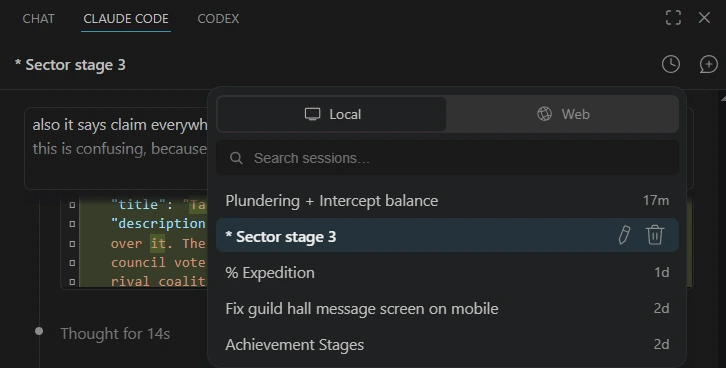
Then it gets hard in a way that has nothing to do with the code. You lose track of where you are. I started naming sessions and putting a * at the front of the ones I was mid-thought on, just to remember which was which. That helps a bit, but it’s a patch on a bigger problem.
The real cost shows up in the evening. You’ll feel like you got a lot done, and you did, but you’re brain dead. Constantly switching between four half-finished threads all day is genuinely tiring, and if you do it every day you burn out. Cognitive switching at that volume isn’t healthy, and pretending it is will catch up with you.
The wrong fix is going back to two
So the obvious move is to drop back to two agents and accept the slower pace. That’s the wrong call. The problem was never the number of agents. It was that there was nothing holding the work together underneath them.
Build a system, and four becomes easy. The rest of this post is the system.
Tickets go in first
Every session starts from a ticket. Nothing gets worked on unless it’s a ticket, and it doesn’t matter where the tickets live. A folder of markdown files, Jira, Trello, ClickUp, Linear, any of them work. All that matters is your agent has a skill that can reach them, through an MCP server or an API.
So the first thing a new session does is load its ticket. You start the session, give it the ticket id, and let it read and understand the ticket before it touches any code. I have the skill do a quick surface read and reply with its take on the ticket first. That early reply is worth more than it looks. It catches the tickets I wrote badly, and it gives me a second read on the ones I assumed were simple.
The /now-what skill
You will come back to a session and have no idea what you were doing in it. Four threads, a couple of hours apart, and the context is gone from your head. I told the AI exactly that problem and had it build a small skill for it: /now-what.
It does one thing. It tells you what happened in this session, where things stand right now, and what the next step is. Nothing more. I type it into a session I’ve lost the thread on, read three lines, and I’m back in it. Keeping the skill that narrow is the point, because a long summary would just be another thing to read.
The morning: load a batch, then work it down
My mornings are just tickets. Here’s the actual routine:
- Decide what to work on. I either ask the AI what today should look like, using a
/weeklyskill that reads across everything, or I go straight to the ticket list. - Load a batch. One button copies a ticket into a session in the editor. I do that for three to six of them, one ticket per agent, and let them all load their tickets in.
- Hit the small ones first. I flick to a session, check the agent’s first results, guide it, tell it what to do next, press return, and move to the next thread while that one runs.
- Close finished work as you go. A quick fix might take ten minutes. When it’s done I run the
/commitskill and close the session. An open session I’m finished with is just noise. - Top up when you run low. When I’m down to about three sessions left, I go back to the backlog and load more in.
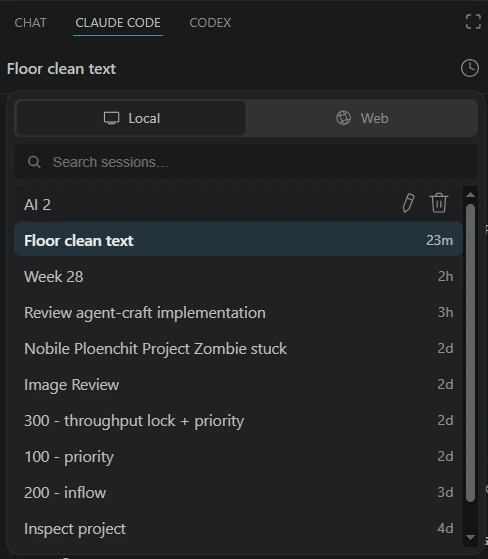
Every so often I clear every session in an editor and start a completely fresh batch. It feels good, and a clean slate is easier to think in than a screen full of half-done threads.
Planning sessions get archived, not worked
Not every session writes code. Some are just planning and investigation. If a ticket is really an epic, I use the session to plan it and break it into smaller tasks. Then I commit the planning docs as a chore, archive that session, and load the individual tasks into new sessions to work through one at a time. The planning session did its job the moment the tasks existed.
One session can carry several tickets
Sometimes it makes sense to run more than one ticket through the same session. If the next ticket is in the same area of the code, the agent already has the context it built up on the first one, and that context is worth using rather than throwing away by opening a fresh session.
Two rules keep this from turning into a mess. Commit and close off the first ticket before you start the second, so nothing half-finished carries over. And keep an eye on how many times the context window has been compacted. Around two compactions is about as far as I’ll push it before the earlier context gets too lossy to trust, though that number keeps moving as the models get better.
Several editors, not just several sessions
The batch isn’t only sessions. It’s editors too. I keep a few VS Code windows open and feed a different batch of tickets into each one, so it’s not six tickets going at once, it’s six across three editors. Some days I don’t touch all of them. Depending on how I feel, I’ll focus on one editor and come back to the others later.
This is why I work in VS Code rather than the CLI or the desktop apps. Each window is one project and nothing else. I can glance at a screen and see the six loaded tickets already split into their own domains, and a different screen is a different project entirely. The CLI and the desktop apps blur all of that into one place, and I lose the separation that keeps each project straight.
The point isn’t the session count
It would be easy to read this as an argument for running as many agents as possible. It isn’t. A dozen sessions with nothing underneath them is just a dozen ways to lose your place, which is exactly the state that burned me out in the first place.
Every piece of work is a ticket. A small skill catches you up when you lose the thread. The morning batch has a rhythm, and the editors keep the projects apart. The number of agents is just what’s left over once that structure is doing its job. Build the structure first, and the scale comes for free.
I build Inselnova, a free browser strategy game, this way. Play here.