I stopped answering my AI's questions in markdown files
 by Darren, who builds Inselnova
This dev log is about Inselnova: one island, sea wars and alliance politics in a world that never resets. Play free →
TL;DR: My AI agents keep coming back with questions to answer, designs to approve and finished features to test. I used to answer their questions by typing into markdown files, and I got tired of that. So I had them build a small local page called desk, where the agent writes the questions, mockups and test steps and I answer with buttons. It does three jobs: questions, designs and QA walkthroughs. I’m not answering in a text editor any more.
Where the questions come from
A feature starts as a ticket. I talk to Claude Code about it the way I’d talk to a colleague, sometimes with several tickets collected together, and we go back and forth while I tell it what I think. Then the agent writes it up as a spec. I might run my own review skills over it (balance, economy, or a council that gets a second model’s view) until I’m happy it’s sound. Then the agent produces designs, and then it comes back with questions.
Later, once the feature is built, there’s a second round: it needs testing. So the agents keep returning to me with three things, questions to answer, designs to approve and something to QA.
The problem with markdown
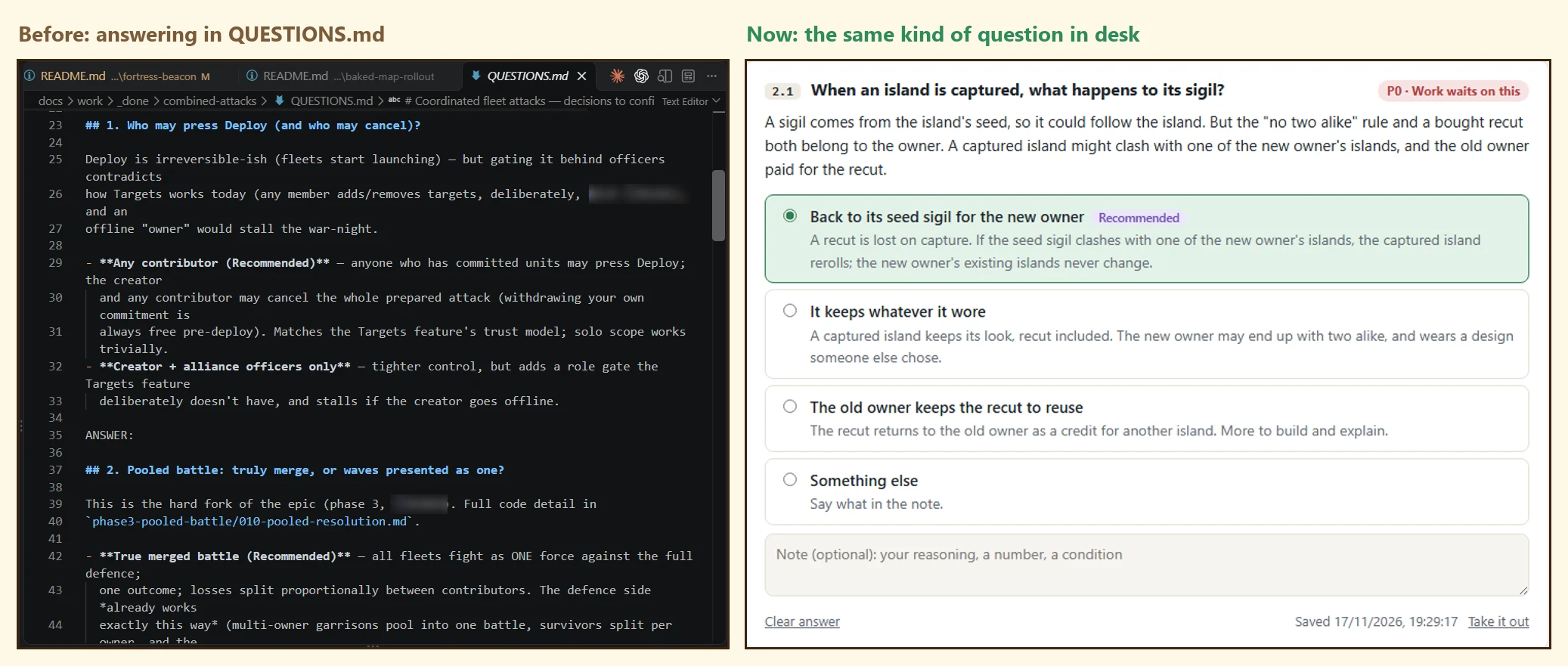
The questions went into a QUESTIONS.md, and I answered by typing under each one. It worked, but I was editing a text file to make decisions. In VS Code the markdown preview isn’t really editable, so you’re working in the raw file, where the editor gives you some syntax highlighting and not much else. You get used to reading markdown files, but a text file isn’t a good place to make one decision after another.
At some point I thought: oh no, I need an interface that gives me buttons. A page can also show me things a text file can’t: the mockup a question is about, images, colour, and a list I can step through instead of one long file.
I use Claude Artifacts a lot, and they’d be a reasonable place for this. But you can now tell Claude to build the same thing as a local HTML page, and I get more control because it’s on my machine. It’s also quicker to get through.
What desk is
desk is a skill plus a small local tool that serves one page. The first commit was on 13 November. It has no build step: one HTML page, a small Node server and a YAML library as its only dependency. I told the agents what I wanted and they built it. It only runs on my machine.
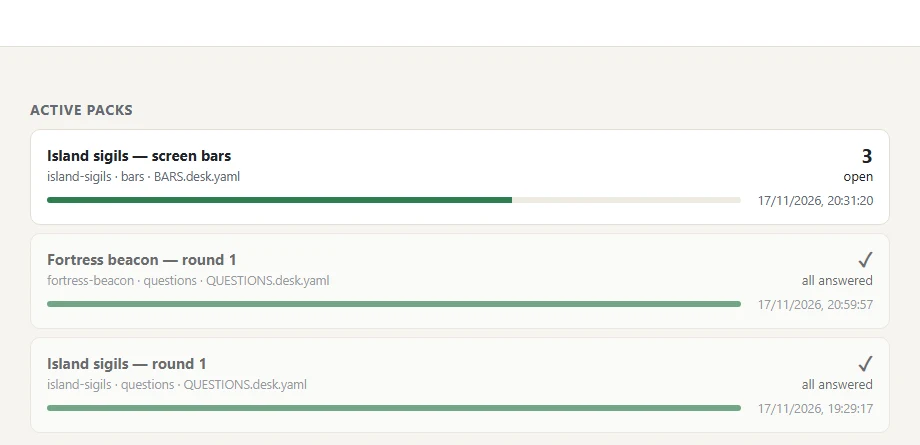
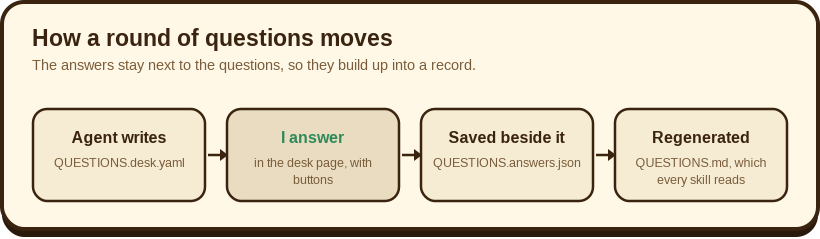
The agent writes a .desk.yaml file in the work folder. That file is either a round of questions, a walkthrough, or a set of screens to approve. I answer in the page, it saves my answers to an .answers.json file beside it, and it regenerates a markdown file so every other skill can still read the decisions in the format it already knows. When I’m done, I go back to the chat and tell the agent something like “I answered the questions”, and it picks up from there. The agents are told never to change an answer I set, and if they record a call I made in chat, it’s marked as theirs. The front page lists every desk with its open and answered counts, so I can see what’s waiting on me.
Questions
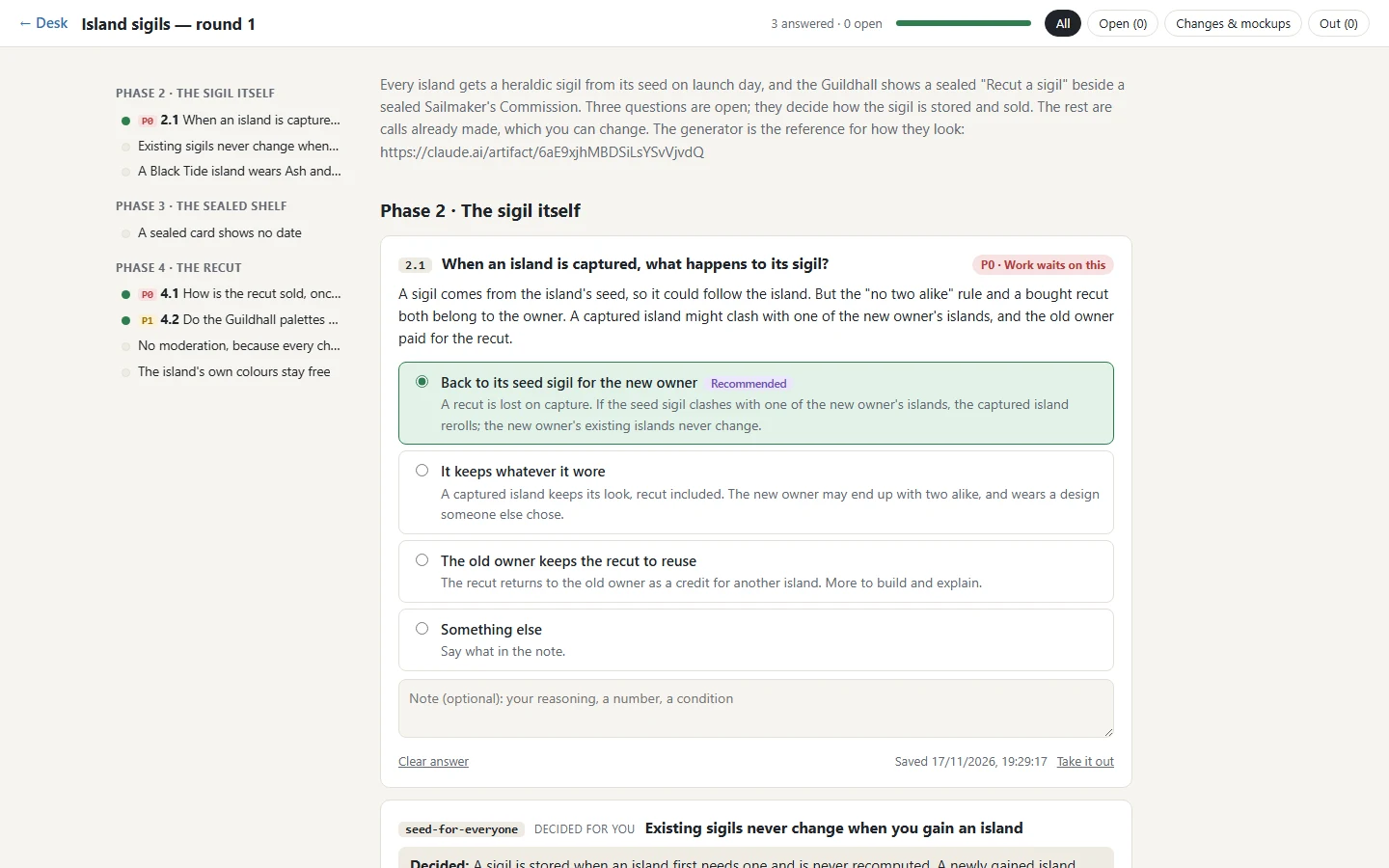
Each question has a priority. P0 means the work waits on it, and P1 means I need to answer before the release ships. There’s nothing lower than that. Each question has a few options with one marked Recommended, a “Something else” option, an optional note box, and a “Saved” label with the time.
The calls the agent can reasonably make itself show up as “Decided for you”, with a “Change it” button if I disagree. Those never count as open. On 14 November, the day after the first version, the agents were asking me too much, so desk got the priorities, the “Decided for you” list and a warning when a round goes past five questions or a walkthrough past twelve steps. The first island sigils round was three questions, with five more decided for me.
Designs
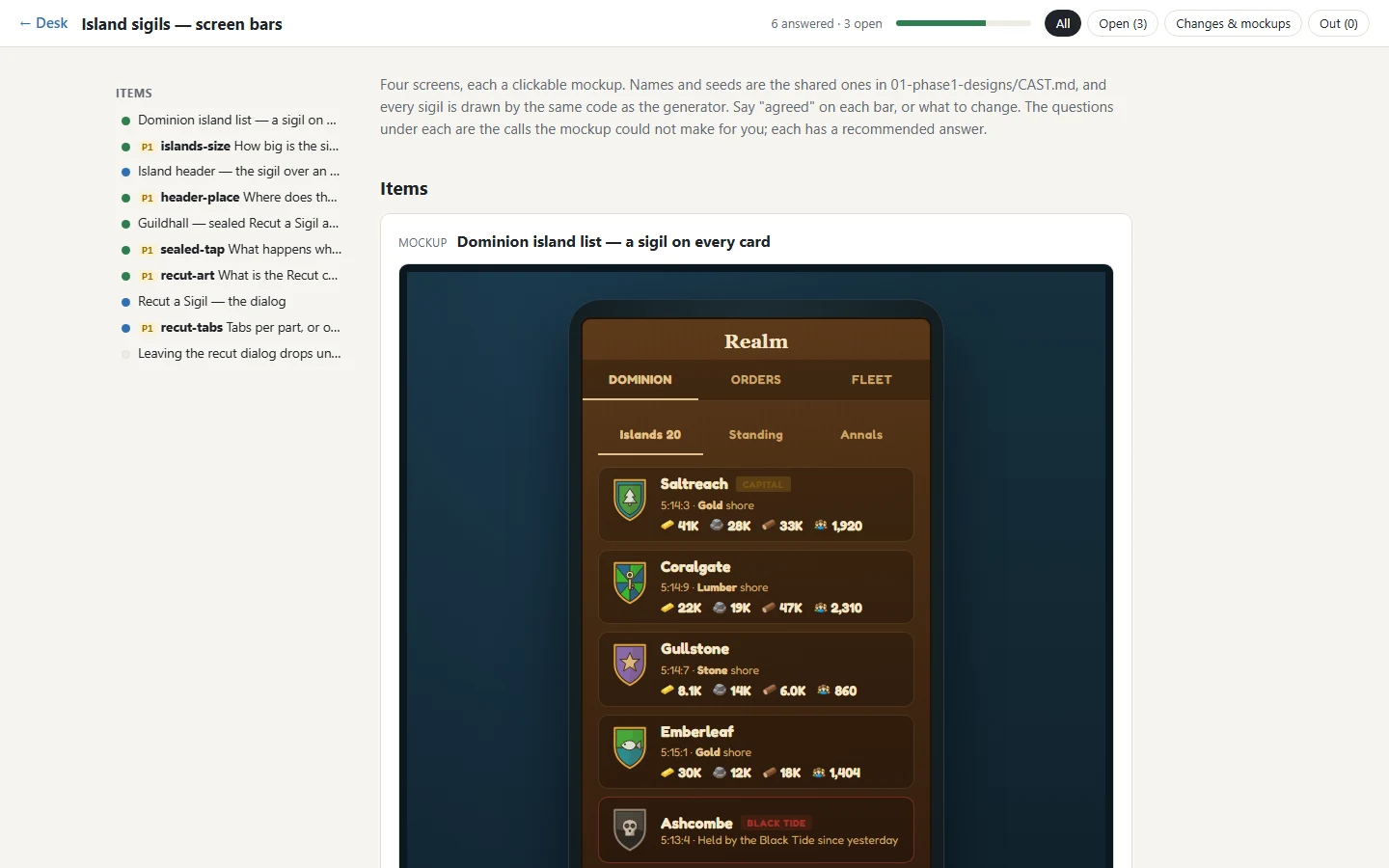
The agent builds each screen as a clickable mockup, and the page renders it inline. I click through it and either say “agreed” or write what to change. A question can also open the mockup on the exact state it’s asking about, so I’m deciding while looking at the screen in question.
Sometimes the agent designs things I didn’t ask for, and this is where I can catch it, before any of it is built. The island sigils round had four screens to approve and five questions about them, and when this screenshot was taken three were still open.
Walkthroughs
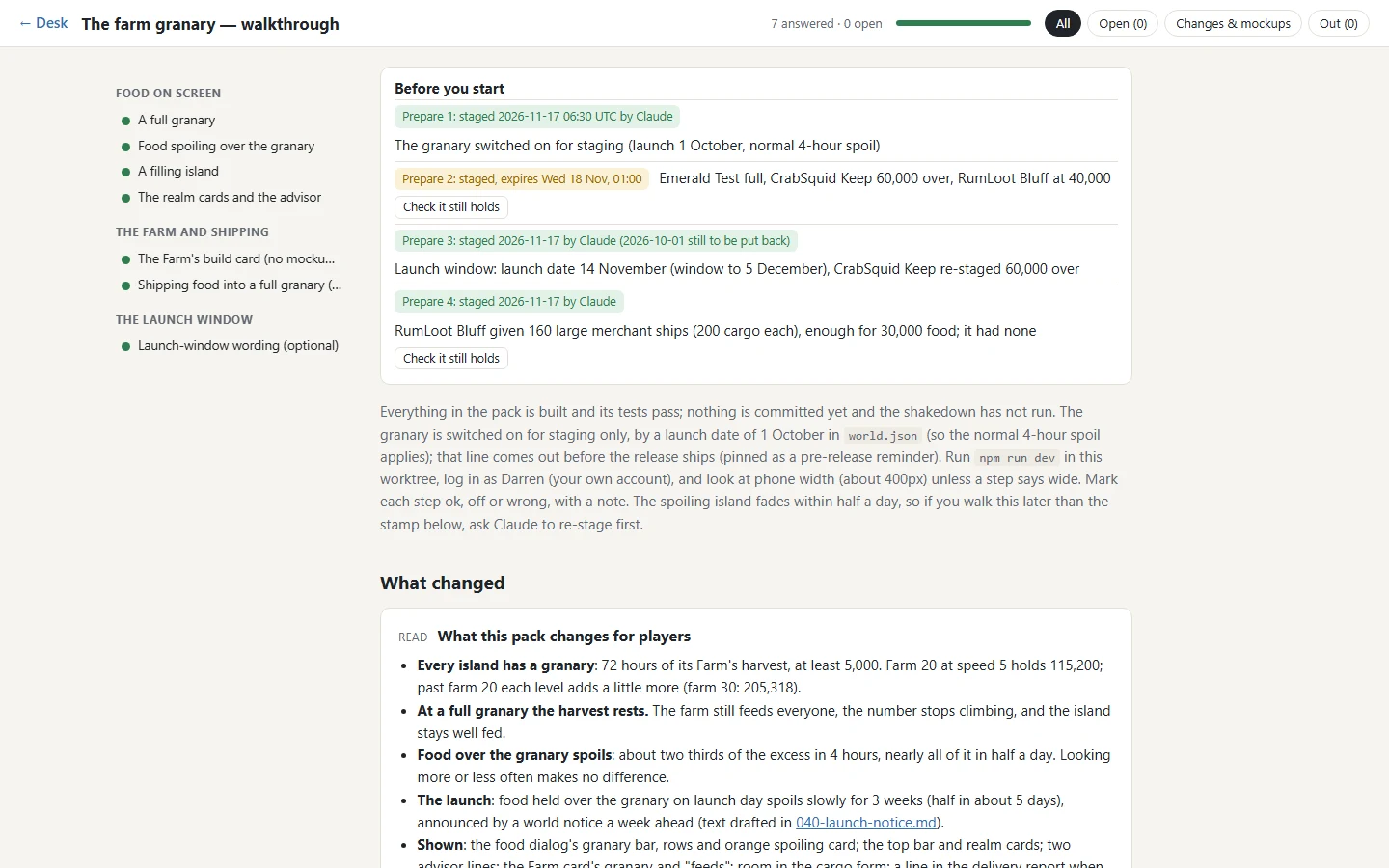
A walkthrough reads like a QA person handed me a script: do this, do this, do this. At the top, a “Before you start” section says what Claude set up on the staging world and when it expires, for example “staged, expires Wed 18 Nov”. A “Check it still holds” button runs a read-only check that the test data is still there, and the page warns me when staging has gone stale.
Each step says which test account to log in as, and a “Play as” button signs that account into the local game. For each step I mark ok, off or wrong and type a note if I need one. The farm granary walkthrough had seven steps, and I answered all of them in the page. It saves automatically.
I get answers wrong quite often, because I don’t always know what I want. The walkthrough is where I catch it, because I’m using the feature instead of reading about it, so I mark the step and write what should change.
How to build your own
You don’t need my version. This is what it comes down to:
- Have the agent write a structured file for each round, not a prose document. Mine is YAML, with questions, walkthrough steps or screens.
- Serve it from a local page that turns the file into buttons: options, a recommended one, a note box.
- Save your answers to a separate file beside it, and don’t let the agent overwrite your answers. If it records one for you, mark it as its own.
- Regenerate a markdown file from the answers, so your other skills can keep reading plain text.
- Warn when a round has too many questions, and let the agent decide the ones with a sensible default and tell you what it chose.
- Write walkthrough steps as scenarios: what was set up, which account to log in as, what to do, and what you should see.
What it changed
I’m not looking at a text editor to answer the agents any more, and it feels a lot smoother. The answer files also turn into a record. Each call I make in desk is saved next to the question that asked it, so when an agent picks the work up later, or I’ve forgotten why something is the way it is, the answer is sitting there.