Building a character creator out of AI art in a day
This dev log is about Inselnova: one island, sea wars and alliance politics in a world that never resets. Play free →
TL;DR: Inselnova has eight fixed portraits, and the next version needs a lot more than eight because island stewards turn characters into part of the game rather than a profile picture. I tried turning the existing art into layered SVG parts. It looked terrible. What worked in the end was getting the image model to draw hair, hats and beards on top of a bright magenta mannequin head, then writing code to cut the mannequin back out.
Eight faces, and some of them have transparent eyes
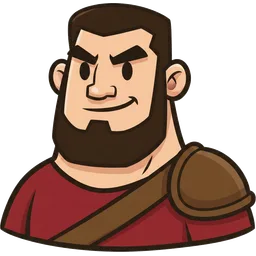
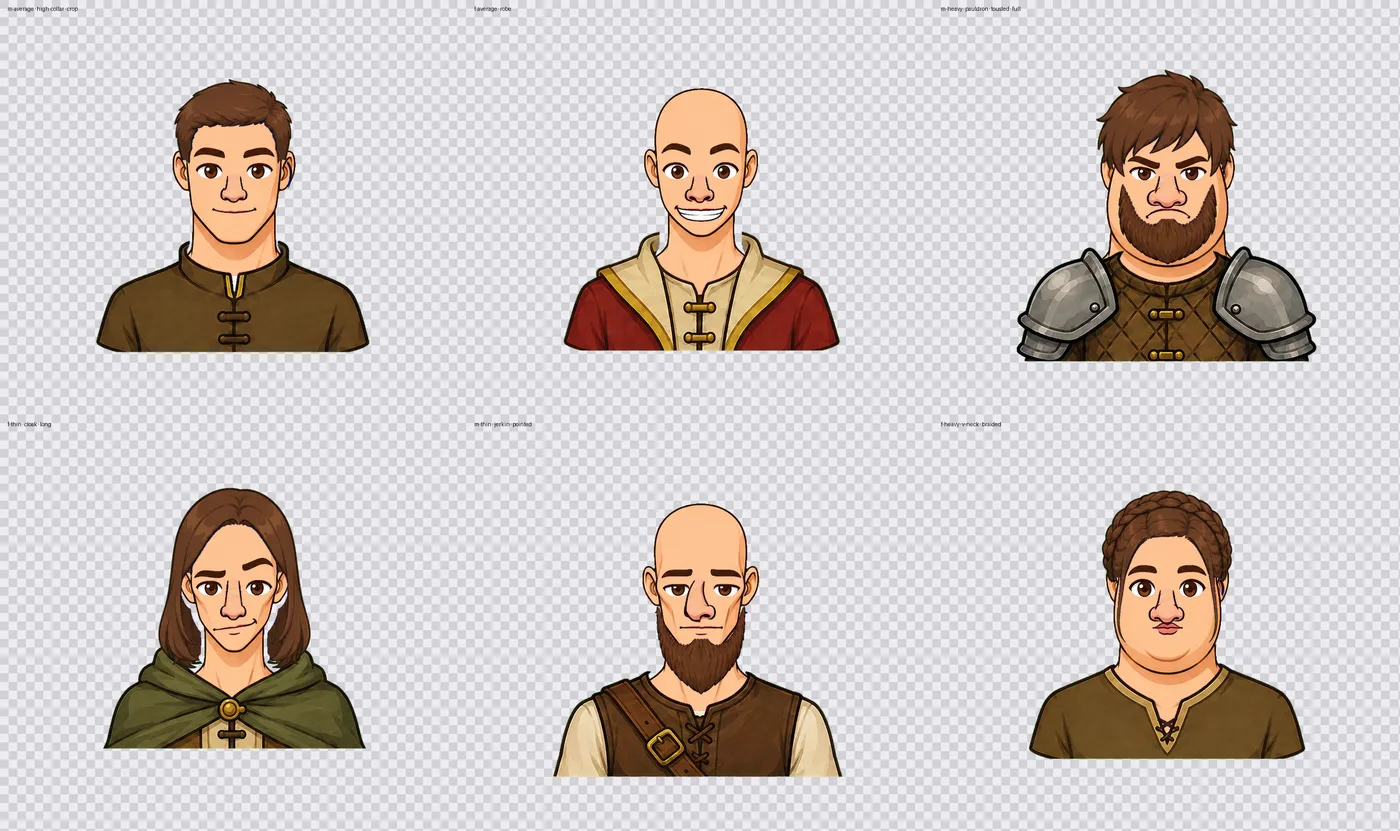
The avatars went in at the very start of the game and I’ve never been back to them. An AI made them and they set the house style: bold warm-brown outlines, painterly cel shading, muted colours. They’ve sat there ever since. Look closely at a few and the eyes are transparent. Replacing them, adding more, or making them customisable has been on the list for months, and a few players asked for customisable ones back then too.
What moved it up the list is stewards. At the moment you pick an avatar when you sign up and that’s the end of it. With stewards, characters start turning up all over the game, one running each island. There are 18 character images in there now and only about 10 of them work for that, so if you’re running 20 islands you’d be looking at the same ten blokes on repeat. That looks ridiculous, and it kills the bit I actually want, which is that you feel something about the person running the place. Customising is fun on its own. It’s also a hook. Build the person and you’re attached to them.
So this became a side quest. I thought it would be a small one: take the existing portraits, cut them into parts, generate a few more, done. I can’t draw, but I wasn’t planning to.
The first attempt: layered SVG
The obvious route was converting the eight portraits into layered SVG. That was mostly about the players who already have these avatars. Whatever I built had to replace what they’re using now, and SVG looked like the way to make the whole thing recolourable. Hair as one layer, eyes as another, swap parts around, change colours with a CSS variable. Tiny files.
I built the whole thing before looking at it properly. A rig, part modules, presets for all eight characters.
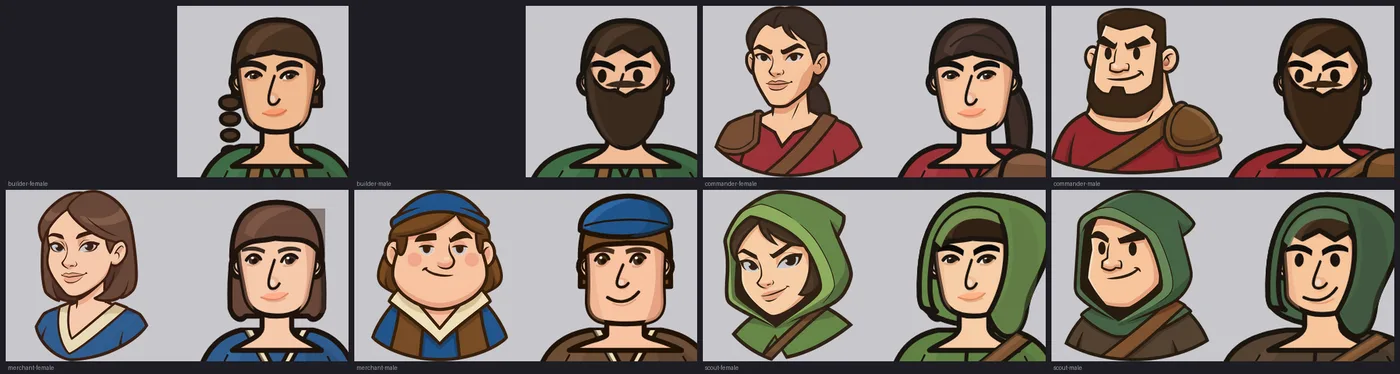
They look like a three year old drew them. The moustache-as-two-dots on the builder is doing something I still can’t explain.
The layering itself was fine. 96 combinations, nothing collided, nothing drifted. So the idea worked and the drawing was rubbish, which at least narrowed it down.
I stopped building the engine at that point and started running small experiments instead. Numbered directories, one method each, get a single face right before generalising anything. Hand-authoring the curves myself got me no closer, because you write coordinates, render it, squint, adjust, and you’re still guessing. The only useful thing to come out of it was a comparison harness.
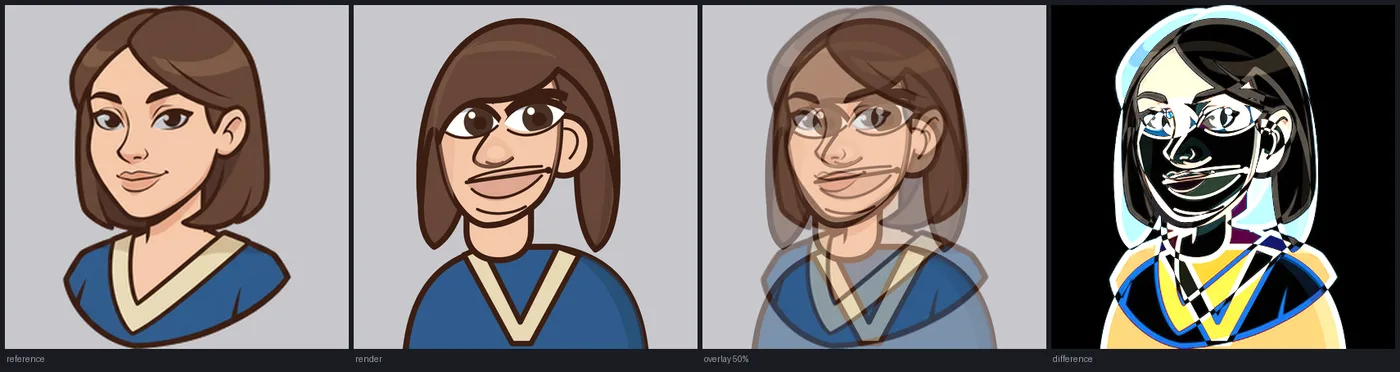
Everything glowing white in that last panel is where the proportions are wrong, which is most of the face.
Tracing the original portraits went no better. Nothing usable came out of it. The ink shredded into chains of tiny disconnected polygons so the line weight was gone, and the colour regions that did trace came out flat and dead next to the painting they came from. There’s a worse problem with tracing that I didn’t spot until later: hair traced off one character’s head is welded to that skull and can’t be dropped onto anyone else. Even a perfect trace wouldn’t have got me a character creator.
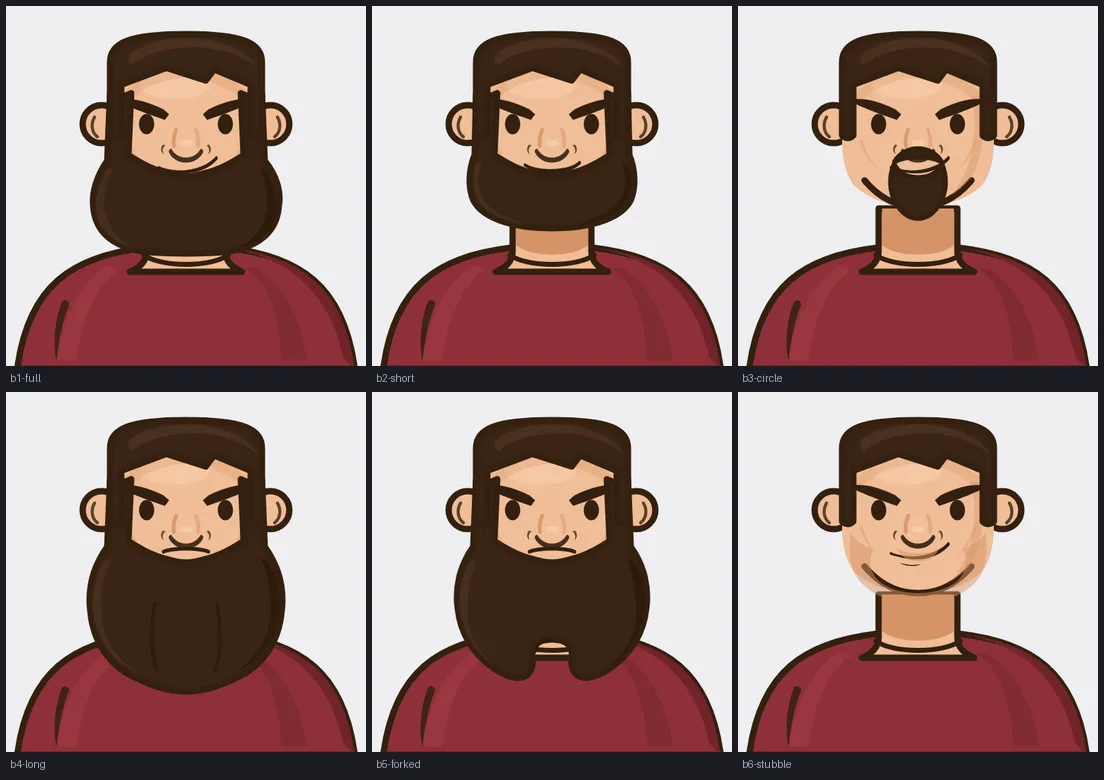
By this point I’d built an actual parametric face generator, which was considerably more work than I’d meant to do. Consistent faces, jaw variants, six beards, brow and mouth shapes. And it still looked cheap next to the original portraits. What I wrote at the time was “even the first one doesn’t feel high quality. Swapping these with our png files just won’t cut it.”
Switching models
I asked for a rethink twice and got the same answer both times in different words. Tweak the curves, adjust the ramps, try another variant sheet. So I switched models mid-conversation and asked for a fresh approach to the same test.
That’s where it stopped trying to draw the avatars and started trying to cut them out instead.
I don’t think the second model was cleverer. It hadn’t spent the previous two hours arguing for SVG. Everything the first one had learned about why SVG was hard was also a pile of reasons to keep going with it. When you’re stuck in a loop like that it’s worth suspecting the conversation rather than the model, and switching is just the blunt way to clear it. A new session or “forget everything we’ve tried” would probably do the same job. Two hours of work went in the bin and I don’t regret it.
The mannequin
What I’d been getting wrong is that I kept asking for parts. The model draws well. Getting it to draw precisely sized, precisely placed components that fit together was a losing battle. So: ask for a sheet of parts drawn on top of a fixed shape, and cut them out afterwards with code.
A green screen, basically.
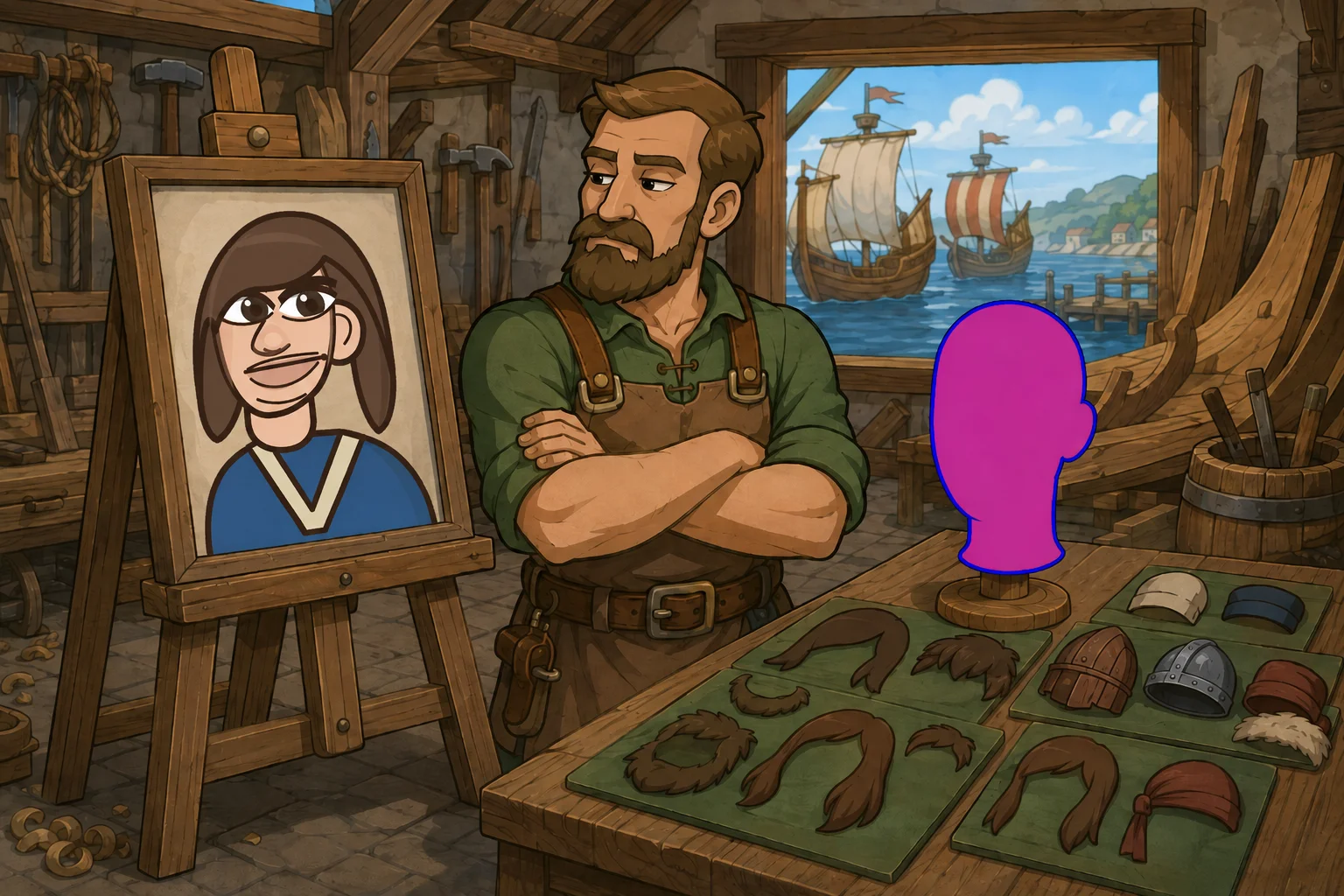
First go was a green background with a grey mannequin head for the hair to sit on. That nearly worked. Except I’d drawn the mannequin’s outline in the same dark brown as the artwork, so the cutter had no way of knowing whether a brown pixel was hair or head, and it kept slicing off jaws and ears. Obvious in hindsight. Not obvious until I looked at the cut-outs.
The fix was to make every bit of scaffolding a colour that appears nowhere in the art.
| Colour | Hex | Role |
|---|---|---|
| green | #00FF00 | sheet background |
| magenta | #FF00FF | the mannequin head, flat and unshaded |
| blue | #0000FF | the mannequin’s outline |
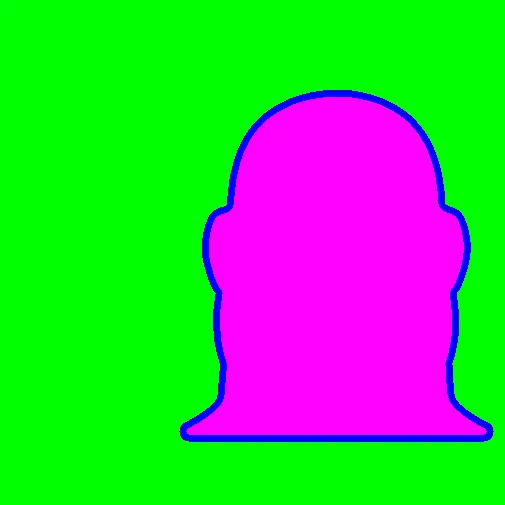
Now the cut is arithmetic instead of guesswork. Anything magenta or blue is scaffolding, anything else is art.
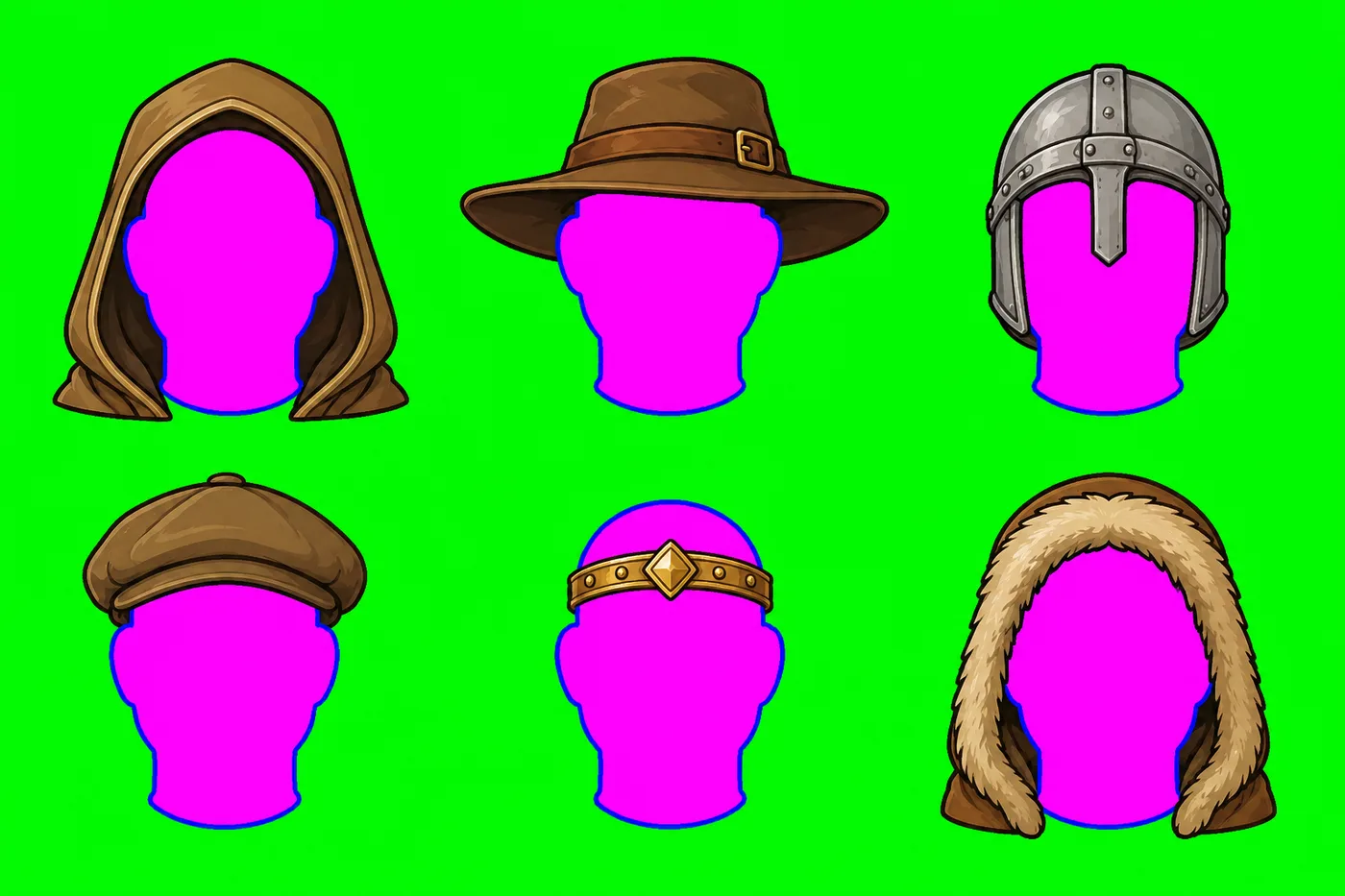
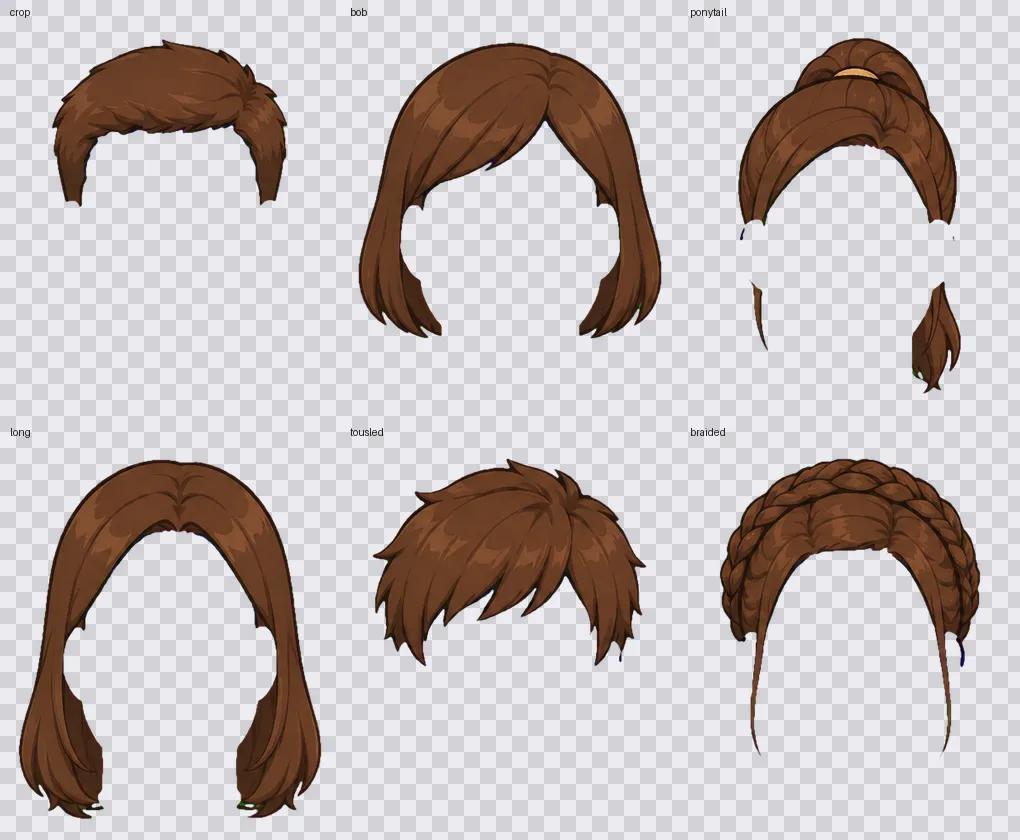
That worked on the first serious try, and the difference against the SVG attempts was not small. What was left to sort out was mostly z-indexing, which parts sit in front of which, and that’s a layer order you set once.
Then the matrix, every garment against every hairstyle:
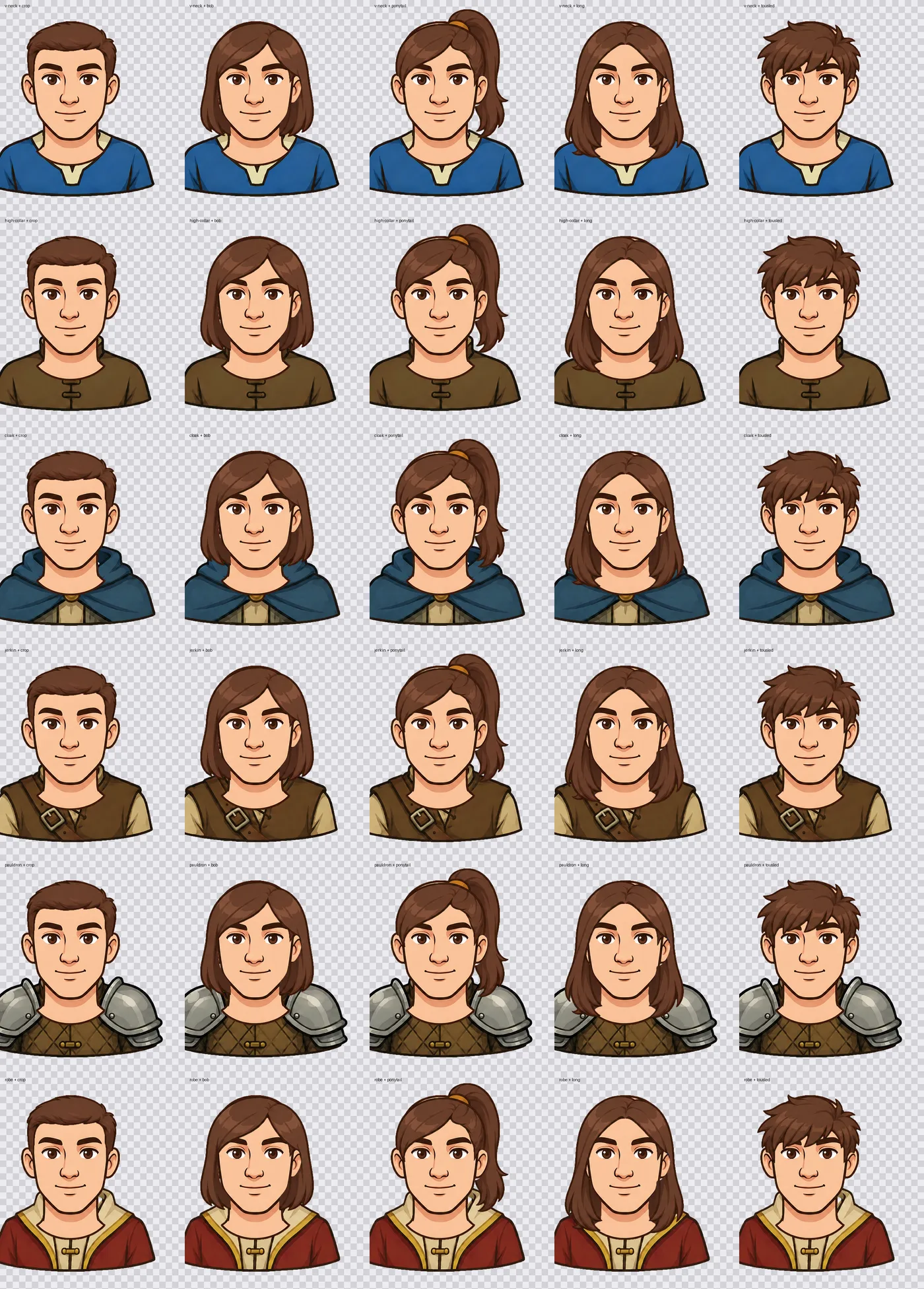
Thirty combinations out of eleven parts and none of them broken. Parts drawn on separate sheets, by separate prompts, dropping onto each other without argument. That was the point I stopped worrying about whether the approach would hold.
The prompt
The prompt does most of the work in this pipeline. Here’s the hair sheet, trimmed. It didn’t start this long. Every clause got added after a sheet came back wrong, and once something’s in there it stays in.
Create a wide landscape sprite sheet for a 2D game avatar system, in EXACTLY the art style of
the second attached image: same bold dark-brown outlines, same line weight, same painterly cel
shading with a lighter and a darker tone, same colours.

Layout: a 2x3 grid (2 rows, 3 columns), 6 cells. Generous empty margin around every subject,
nothing touches a cell edge, nothing overlaps between cells.

Every cell shows a blank mannequin head: filled with flat solid pure magenta #FF00FF, one single
flat colour, completely unshaded, no gradients, no highlights, no darker areas, no texture, with
no face at all, and outlined with a pure blue #0000FF line the same thickness as the outlines in
the style image.

On top of each magenta mannequin, draw one hairstyle in medium chestnut brown, fully rendered in
the normal art style with its own dark-brown outline and cel shading, overlapping the head
exactly as real hair sits on it: (1) short cropped, (2) chin-length bob, (3) ponytail, (4) long
shoulder-length, (5) short tousled with a fringe, (6) braided and pinned up.

Each hairstyle must completely cover the top of the head, no bare scalp showing anywhere between
the hairline and the crown.

The magenta head must be the same SHAPE as the head in the first attached image, same
proportions, same crown, same ears, same jaw, same neck. Do not redesign it. The magenta head's
ONLY outline is the pure blue #0000FF one, do NOT draw any brown or black line around the head,
the jaw or the neck. Every other dark outline in the cell belongs to the part itself.

How big it is drawn on the canvas does not matter. Match the shape, not the size.

Background: the ENTIRE background, around and between all cells, is one flat solid pure
chroma-key green #00FF00, no gradients, no vignette, no shadows.
Four of those cost me a round each:
- “Match the shape, not the size.” I spent a while asking it to fit inside a 267x382 mannequin. It drew 306x445 heads and carried on ignoring me. I couldn’t get it to obey absolute dimensions from a reference at all, so I gave up and started measuring one scale factor per sheet on import instead.
- “The magenta head’s ONLY outline is the pure blue one.” On one beard sheet it outlined the mannequin’s neck in brown. Brown is artwork by definition, so the cutter kept it, and every beard came out with a box drawn under the chin.
- “Each hairstyle must completely cover the top of the head.” Without it, about a third come back with a bald patch between the hairline and the crown.
- “Absolutely NO clothing, no shirt, no collar.” On the heads sheet that needs saying three different ways. Its instinct for a portrait is to dress it, and asking once politely does nothing.
Things that broke
Four of the six mouths came out empty. I’d built the cutter around a binary mask, pixel is art or pixel is key colour, then a speck filter to drop anything under 700 pixels. A mouth is a 3-pixel line with a total area of a few hundred pixels, so the filter I’d added to clear up keying junk was deleting the artwork.
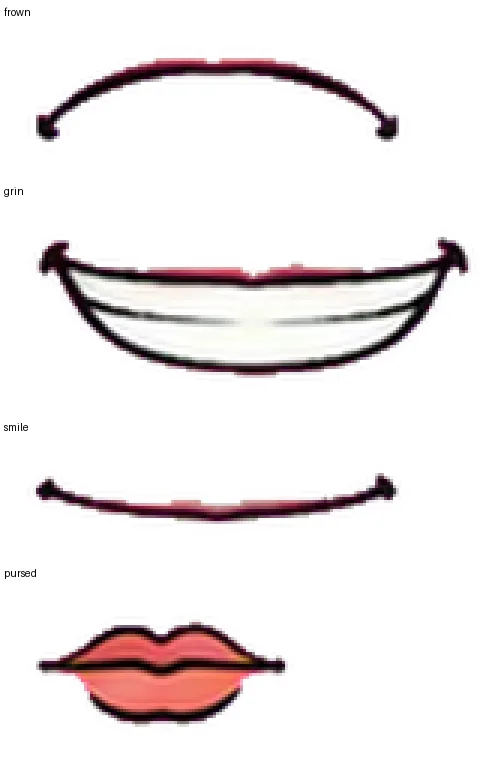
The top half is what a binary key does to a thin line: shredded, full of holes, stained pink from the
magenta behind it. Almost all of a thin line is anti-aliasing and a hard threshold only keeps the
darkest core of it. The fix was proper chroma keying with fractional alpha, unmixing the key colour
back out of each pixel by solving p = a·F + (1−a)·K for F. I’ve lifted that sentence straight out
of what the model wrote for me and I couldn’t explain it to you if you paid me. I know what it does.
The bottom half is the same mouths afterwards.
Black hair lost its outline. The recolouring worked by taking your chosen colour and subtracting a fixed amount for the shading, which is fine until the colour is dark enough that the shade comes out darker than the outline. Then the outline disappears and the hair turns into a silhouette. Four of the ten hair swatches I’d shipped already failed this and black failed completely. I changed it so the shading keeps its contrast inside whatever room the colour leaves, rather than blindly subtracting the same amount every time. Dark colours now read through their highlight and light colours through their shade, which is what the original art does anyway.
The same hairstyle sat differently on every head. I was lining hair up against each head’s own neck, and the heads aren’t built the same: crown-to-neck is 234px on the average one and 262px on the thin one, and the heavy heads have no measurable neck at all because the jaw runs straight into it. What I settled on is to line a part up against the bit of anatomy it actually attaches to, and only against the parts of that anatomy every head shares. Hair sits on the cranium, which is identical by design, so it lines up against a reference head. Garments sit on shoulders, whose height changes per head but whose width doesn’t, so the vertical comes from the head being drawn and the horizontal from the reference. Taking both from the current head slid every garment 28px sideways.
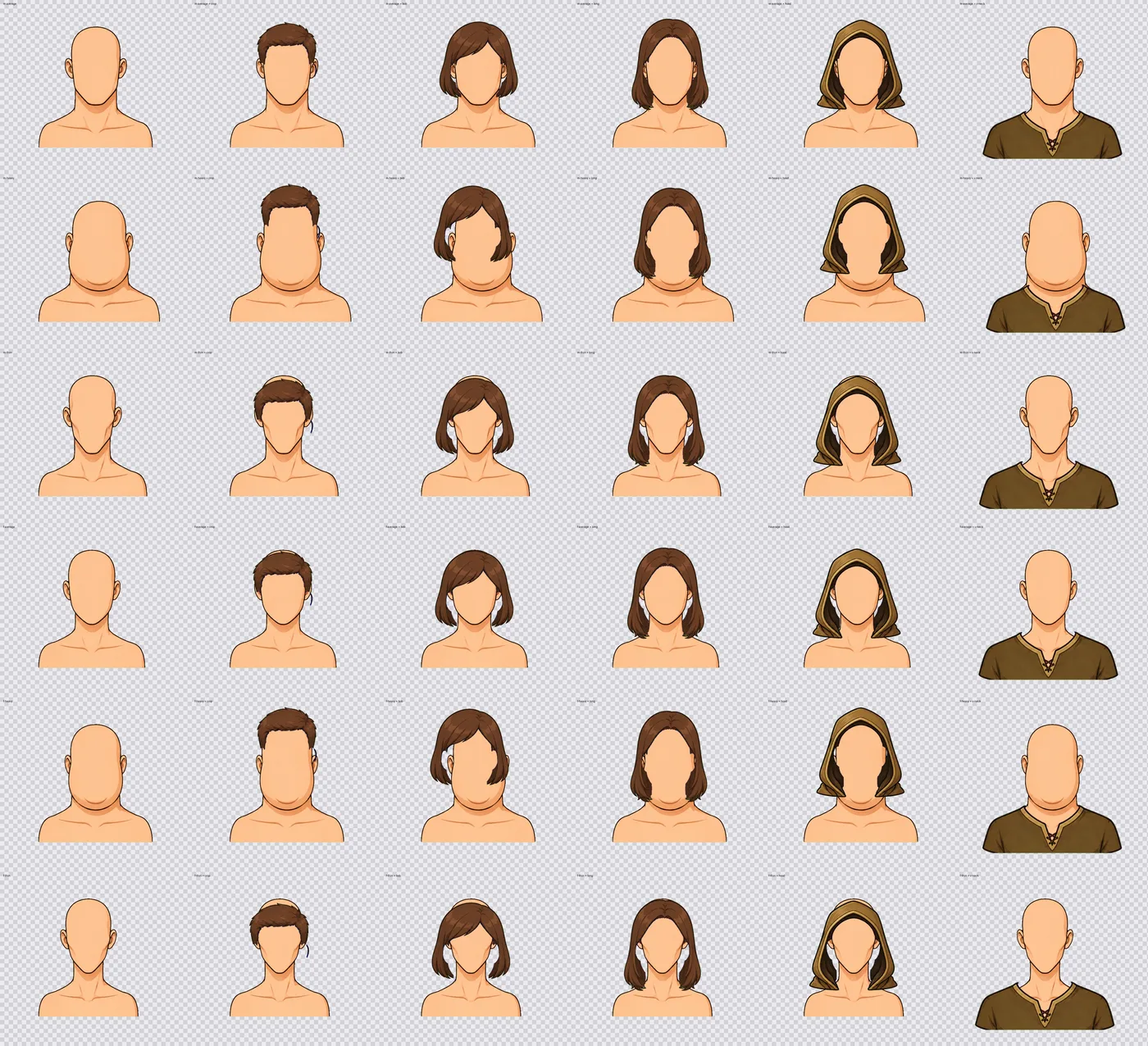
None of those three threw an error, which is what made them annoying. They all looked like art problems. The pipeline now prints residue counts, drift percentages and scale factors on every import, so if a sheet comes in wrong I see it there instead of finding it three weeks later in someone’s blonde hair.
The studio
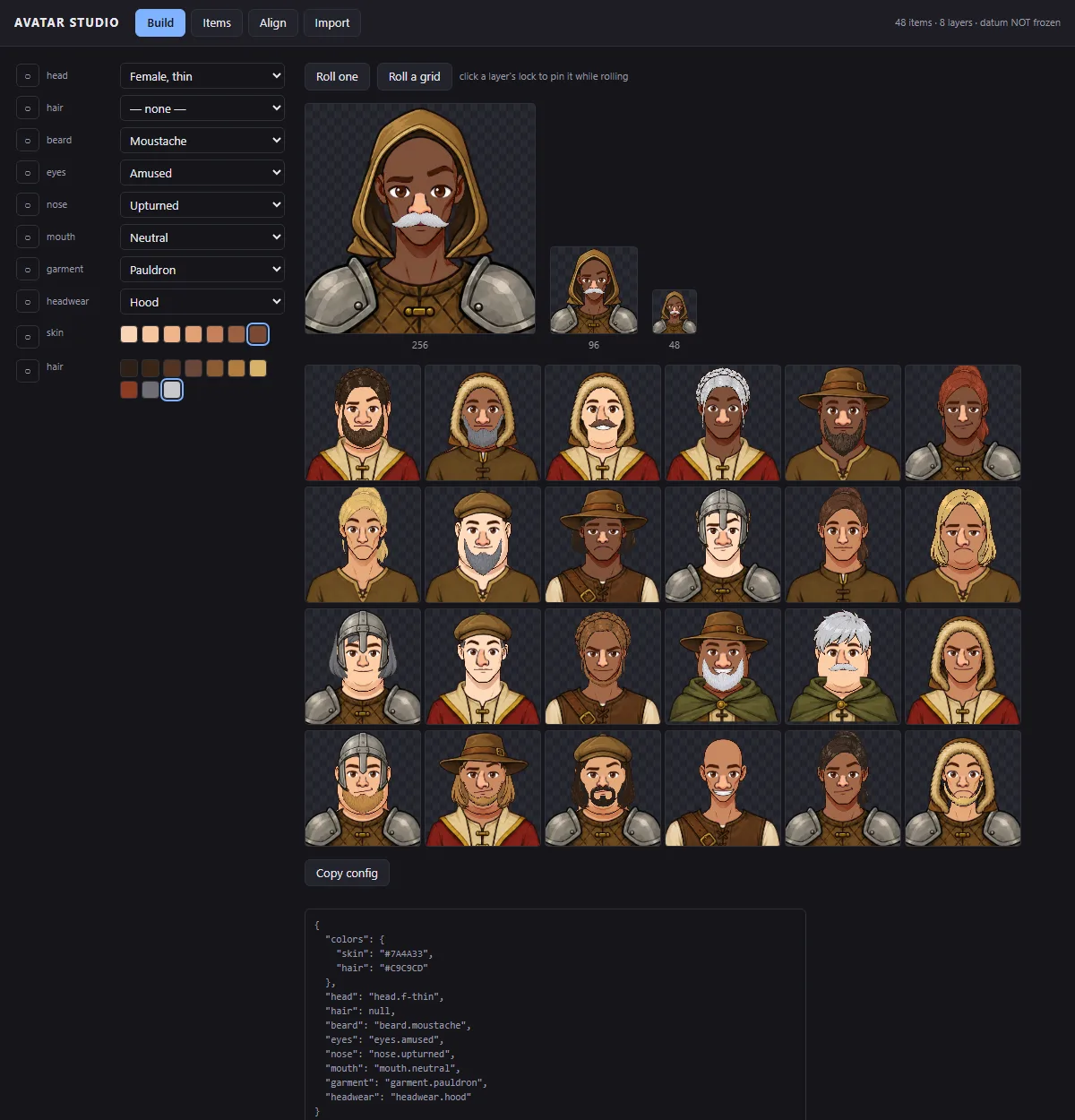
Eight separately generated sheets, head, garment, eyes, nose, mouth, beard, hair and headwear, cut by colour key, normalised per sheet and composited. 48 parts, and roughly 6⁸ combinations before you touch the colours.
Up to here it was a pile of Python scripts and a single-page alignment tool that saved by downloading a JSON file which I then moved into a directory by hand. Fine for proving the method, miserable for living with. So the last stretch was building the actual tool. A build tab that rolls 24 random avatars at once, because rolling one at a time will never find the combination that breaks. An align tab for nudging parts into place. An items tab that previews every part on a real head with a palette strip next to it.
Then a create tab, which closes the loop: describe what you want, get a prompt, paste the generated sheet back, cut, review, commit.
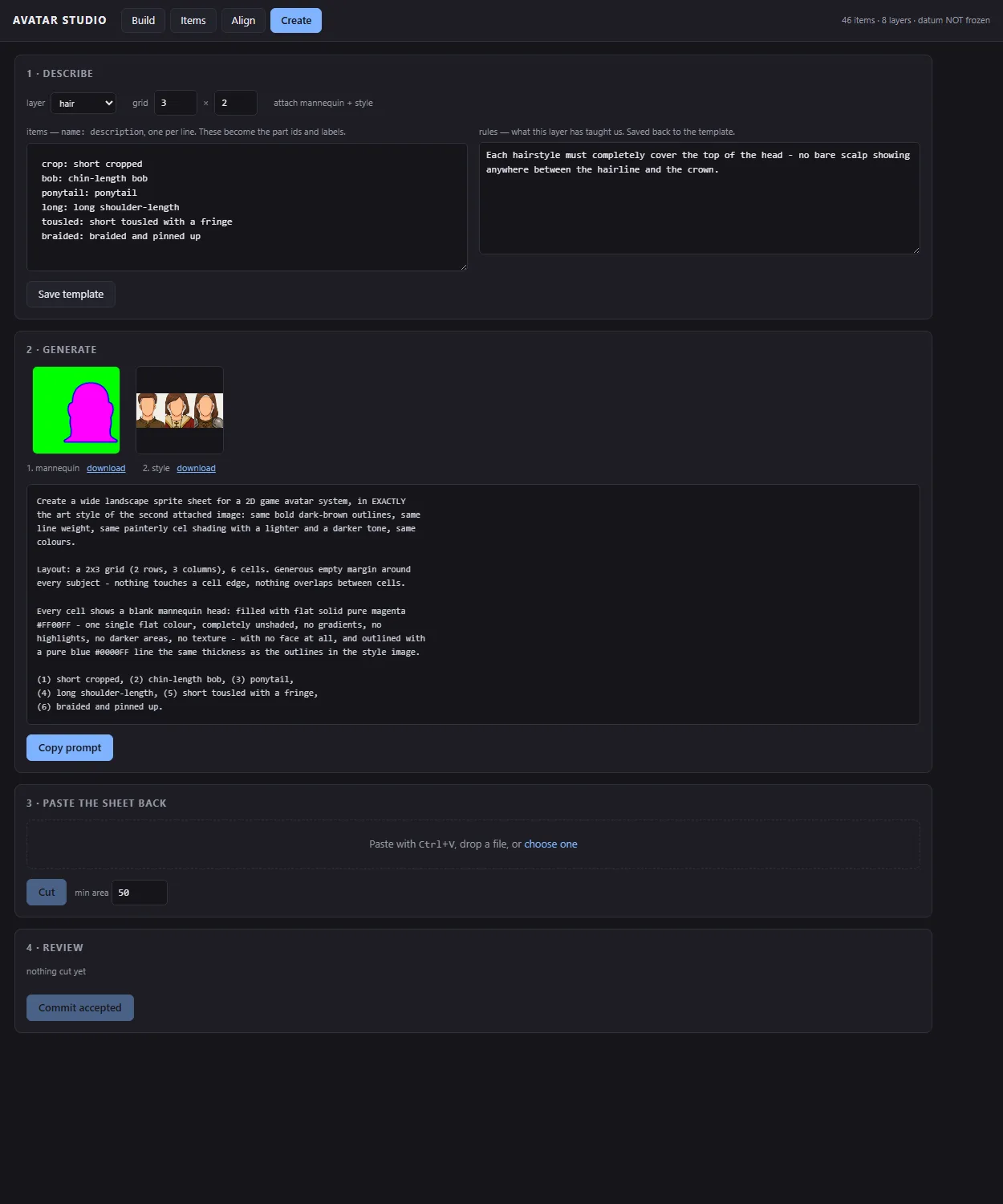
The prompt templates live in version-controlled markdown and the tool writes them back. Every sheet teaches you something, and if the tool only reads the prompts then whatever you learned ends up in a chat log and you learn it again six sheets later. The brown-outline rule, the wide-hood-opening rule and the two-tone shading demand all live in the template now.
Where it is now
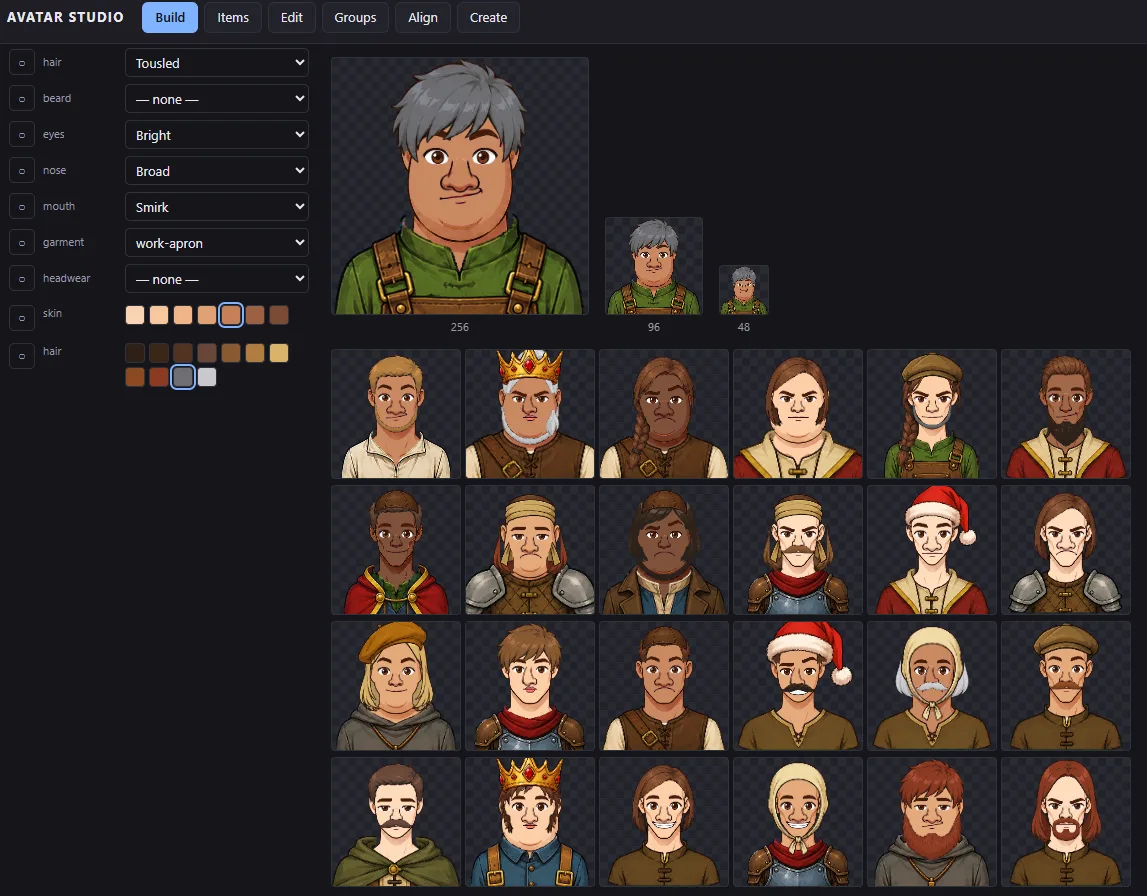
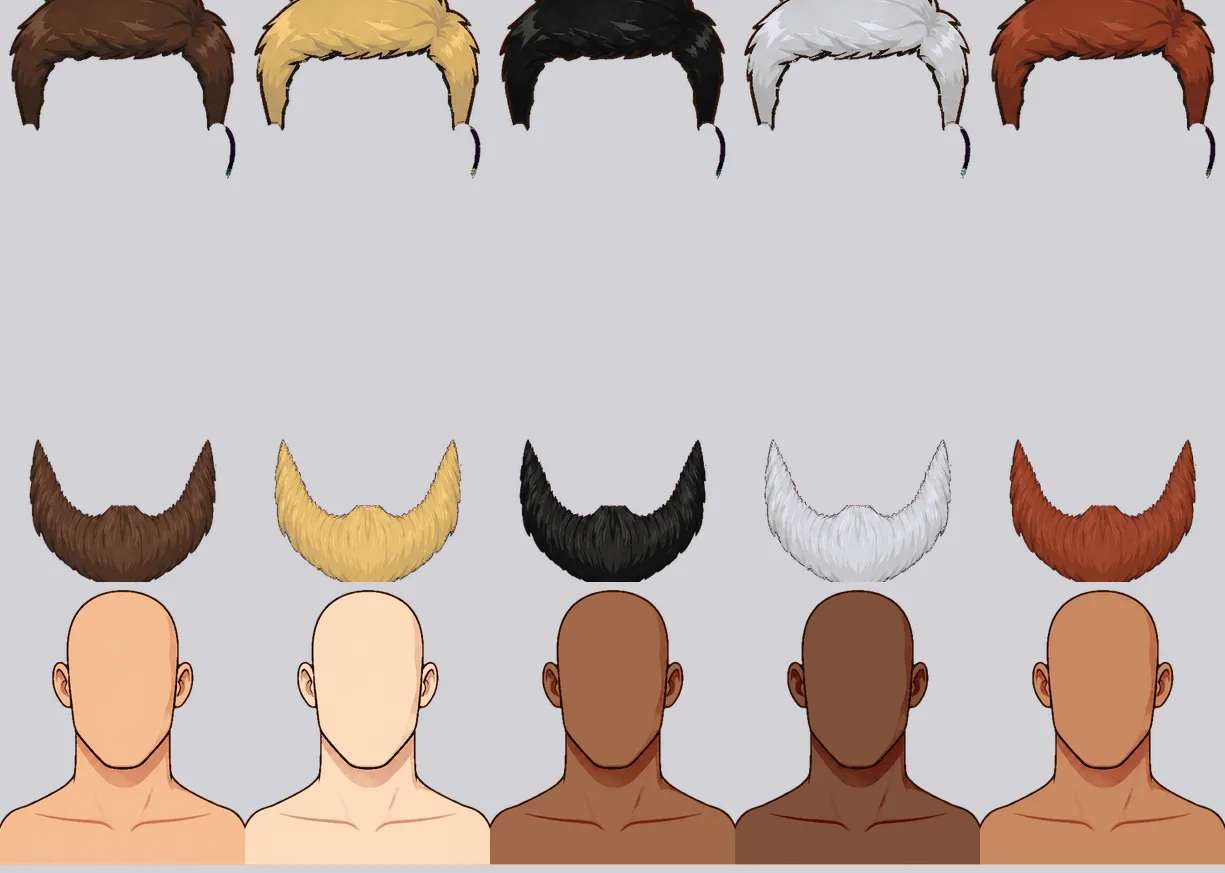
That’s the current library rolled at random. Crowns, santa hats, helms, hoods, aprons, beards, every skin and hair colour in the palette.
It’s still a standalone tool. It builds avatars, it doesn’t ship them, and the game is still loading the same eight portraits it always has. Wiring the two together is next, and the eight go after that.
Some numbers
I kept the transcripts. One long conversation in Claude Code, mostly Opus 5, with one deliberate stretch on a different model. It compacted four times, which is its own kind of test, because the context is gone and what survives is whatever got written down.
| Sitting one, Sunday evening | 20:37 to 23:23, 2.8 h |
| Sitting two, Monday | 07:48 to 19:32, 11.7 h |
| Elapsed, both | 14.5 h |
| Actual back-and-forth, idle gaps removed | 10.4 h |
| Things I asked for | 121 |
| Tool calls the model made | 1,223 |
| Times I interrupted it | 11 |
| Context compactions | 4 |
| Plan mode | 3 |
| Implementations thrown away | 2 |
That’s about ten tool calls for every request I made, which is more than I expected for something I’d written off as a small job. Almost none of it was “write me some code”. It was look, measure, adjust, measure again. A fair amount was questions rather than instructions, and those get you different things. “Why is the hair drifting?” gets you something you can act on. “Fix the hair drifting” gets you a patch you then have to check.
| Tool | Calls | |
|---|---|---|
| Bash | 475 | 38.6% |
| Edit | 324 | 26.3% |
| Read | 236 | 19.2% |
| Write | 115 | 9.3% |
| PowerShell | 61 | 5.0% |
| everything else | 19 | 1.6% |
Writing new files was 9% of it. The other 91% was running things, reading what came back and changing one line. What came out the end was 5,567 lines of TypeScript, 1,302 lines of Python and 91 cut parts across 8 layers.
What it cost
I paid $200, which is the Claude Code Max subscription for the month and not for this project. It used some indeterminate slice of a bill I was already paying, so out of curiosity I worked out what it would have been on the API. The token counts are in the transcript:
| Tokens | |
|---|---|
| Fresh input | 3,714 |
| Cache writes | 49.6 M |
| Cache reads | 734.4 M |
| Output | 2.9 M |
At $5/MTok in and $25/MTok out that’s about $750, or about $2,250 at the older $15/$75 tier. The split is the interesting part. Output, meaning every line of code it wrote, is 10% of the bill. The other 90% is re-reading the conversation, because every turn re-reads the whole thing and by the end the transcript was 138 MB. Those 734 M cache reads bill at a tenth of the input rate, and priced as fresh input the same run comes to roughly $3,990 instead of $750, so caching is what makes a session this long possible at all.
I’m not going to pretend it was free, either. My own 10.4 hours are the biggest real cost in this whatever you price them at, and I’m the developer here, so nothing about this replaced one. What it did change is how much specialist knowledge I could pull in without having it first. I didn’t have to know how to write a chroma keyer, or work out the unmixing formula I’ve already admitted I can’t explain, or know that distance transforms are how you tell an outline from a dark material. That turned up when it was needed and using it was cheap. What stayed expensive was noticing the mouths looked wrong, deciding the SVG line was dead, and knowing that “it looks terrible” is more useful feedback than a bug report. The two implementations that went in the bin went there because I made a bad call, not because the model did.
The agent wrote this as it went
I didn’t write most of this from memory, because I didn’t have to. Once the mannequin idea started
working I thought the whole thing would be worth sharing, so I told the agent to log it as we went.
That instruction sits in the project’s START.md, the brief it reads at the start of every session,
as one line about writing everything into the blog as it goes.
So it did. It kept the running write-up, saved the images into a blog folder beside it, and took its own screenshots of the studio whenever there was something worth showing. The build tab, the cut parts, the shredded mouths, all captured by the thing that had just built them. The cost arithmetic came the same way. I asked it to go back through the transcripts and work out what the run would have billed, and the tables above came out of that.
The useful bit is that the failures got written down on the day rather than reconstructed afterwards. The 700-pixel speck filter, the 28px sideways slide, the 234px against 262px necks. I’d have remembered that the mouths broke. I wouldn’t have remembered any of the numbers.